With Python in Excel you can write a number out in words with a simple cell formula: 1,234.56 becomes One Thousand Two Hundred Thirty-Four Point Five Six, or One Thousand Two Hundred Thirty-Four Rupees and Fifty-Six Paise Only for invoices and cheques. There are two codes: one for words in thousands and millions, and one for rupees and paise in lakh and crore.
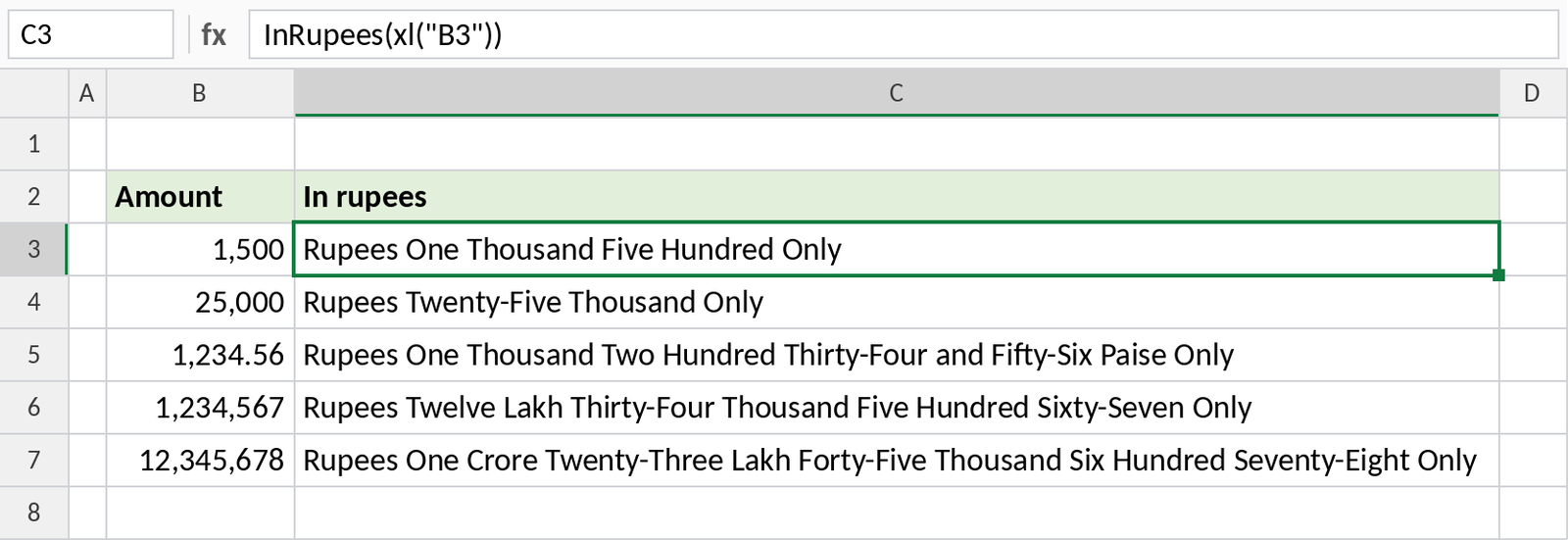
How to use the code
- Type the number in A1.
- Click B1, type
=PY(and press Tab. The cell switches to Python mode. - Paste one of the codes below and press Ctrl + Enter.
- If the cell shows a small Python object instead of the words, change the output to Excel Value with the output menu next to the formula bar (or Ctrl + Alt + Shift + M).
- Copy B1 down. The
xl("A1")on the last line changes to A2, A3 and so on, like a normal formula.
The last line of each code tells it which cell to read. Change A1 if your number is somewhere else.
Code 1: number to words (InWords)
Writes the number in the international system: thousand, million, billion and trillion. Decimals are read digit by digit, so 1,234.56 is One Thousand Two Hundred Thirty-Four Point Five Six.
def InWords(n):
    if isinstance(n, float) and n.is_integer():
        n = int(n)            # 1234.0 -> 1234
    s = str(n).strip()
    try:
        float(s)          # validate it's a number
    except:
        return ""

    ones = ["Zero","One","Two","Three","Four","Five","Six","Seven","Eight","Nine",
            "Ten","Eleven","Twelve","Thirteen","Fourteen","Fifteen","Sixteen",
            "Seventeen","Eighteen","Nineteen"]
    tens = ["","","Twenty","Thirty","Forty","Fifty","Sixty","Seventy","Eighty","Ninety"]

    def three(num):
        if num == 0:
            return ""
        if num < 20:
            return ones[num]
        if num < 100:
            return tens[num // 10] + ("-" + ones[num % 10] if num % 10 else "")
        return ones[num // 100] + " Hundred" + (" " + three(num % 100) if num % 100 else "")

    def whole(num):
        if num == 0:
            return "Zero"
        out = []
        for value, name in [(10**12,"Trillion"), (10**9,"Billion"), (10**6,"Million"), (1000,"Thousand")]:
            if num >= value:
                out.append(three(num // value) + " " + name)
                num %= value
        if num:
            out.append(three(num))
        return " ".join(out)

    negative = s.startswith("-")
    s = s.lstrip("-+")

    if "." in s:
        int_part, dec_part = s.split(".", 1)
    else:
        int_part, dec_part = s, ""

    int_part = int_part or "0"
    words = whole(int(int_part))

    if dec_part:
        words += " Point " + " ".join(ones[int(d)] for d in dec_part)

    return ("Minus " if negative else "") + words

InWords(xl("A1"))Code 2: number to rupees (InRupees)
Writes the amount the Indian way, in lakh and crore, with paise: 1,234.56 is One Thousand Two Hundred Thirty-Four Rupees and Fifty-Six Paise Only. Use it for invoices, receipts and cheques.
def InRupees(n):
    try:
        n = float(n)
    except:
        return ""
    ones = ["","One","Two","Three","Four","Five","Six","Seven","Eight","Nine",
            "Ten","Eleven","Twelve","Thirteen","Fourteen","Fifteen","Sixteen",
            "Seventeen","Eighteen","Nineteen"]
    tens = ["","","Twenty","Thirty","Forty","Fifty","Sixty","Seventy","Eighty","Ninety"]
    def two(num):
        if num == 0:
            return ""
        if num < 20:
            return ones[num]
        return tens[num // 10] + ("-" + ones[num % 10] if num % 10 else "")
    def three(num):
        h, r = num // 100, num % 100
        if h:
            return ones[h] + " Hundred" + (" " + two(r) if r else "")
        return two(r)

    negative = n < 0
    n = abs(n)
    rupees = int(n)
    paise = int(round((n - rupees) * 100))
    if paise == 100:          # guard against rounding up to 100
        rupees += 1
        paise = 0

    def indian(num):
        crore    = num // 10**7
        lakh     = (num // 10**5) % 100
        thousand = (num // 1000) % 100
        rest     = num % 1000
        parts = []
        if crore:    parts.append(indian(crore) + " Crore")   # works past 999 crore
        if lakh:     parts.append(two(lakh) + " Lakh")
        if thousand: parts.append(two(thousand) + " Thousand")
        if rest:     parts.append(three(rest))
        return " ".join(parts)

    if rupees == 0 and paise:  # 0.07 -> Seven Paise Only
        return ("Minus " if negative else "") + two(paise) + " Paise Only"
    words = indian(rupees) if rupees else "Zero"

    result = ("Minus " if negative else "") + words + " Rupees"
    if paise:
        result += " and " + two(paise) + " Paise"
    return result + " Only"

InRupees(xl("A1"))These are the codes from the video, with three small fixes: whole numbers no longer end in “Point Zero”, amounts above 999 crore work, and amounts under one rupee read “Seven Paise Only”.
What you get
| Number | Code 1: InWords | Code 2: InRupees |
|---|---|---|
| 25,000 | Twenty-Five Thousand | Twenty-Five Thousand Rupees Only |
| 1,234,567 | One Million Two Hundred Thirty-Four Thousand Five Hundred Sixty-Seven | Twelve Lakh Thirty-Four Thousand Five Hundred Sixty-Seven Rupees Only |
| 45.50 | Forty-Five Point Five | Forty-Five Rupees and Fifty Paise Only |
| 0.07 | Zero Point Zero Seven | Seven Paise Only |
| -1500 | Minus One Thousand Five Hundred | Minus One Thousand Five Hundred Rupees Only |
Things to know
- Blank cells and text return an empty result, so you can copy the code down past the end of your list.
- InRupees rounds to two decimal places for the paise.
- To drop the word Only, change the last line of the function to
return result. - Python in Excel runs in Microsoft’s cloud, so it needs an internet connection and a Microsoft 365 plan that includes it.
No Python in Excel?
- Use the Excel formula to convert numbers to words. It works in every version, with no code.
- Use the RUPEES function, a VBA macro for lakh and crore.
- In Google Sheets, see convert numbers to words in Google Sheets.
- For a one-off amount, type it into the number to words converter.