The Excel FORMULATEXT function shows the formula in another cell as text. It’s great for tutorials, documentation and checking a model without clicking every cell.
PurposeShow a cell’s formula as text
ReturnsText
Available inExcel 2013 and later, Excel for the web, Google Sheets
reference |
The cell whose formula you want to see. |
|---|
Table of Contents
Basic example
Column F shows the formula behind each total:
=FORMULATEXT(E3)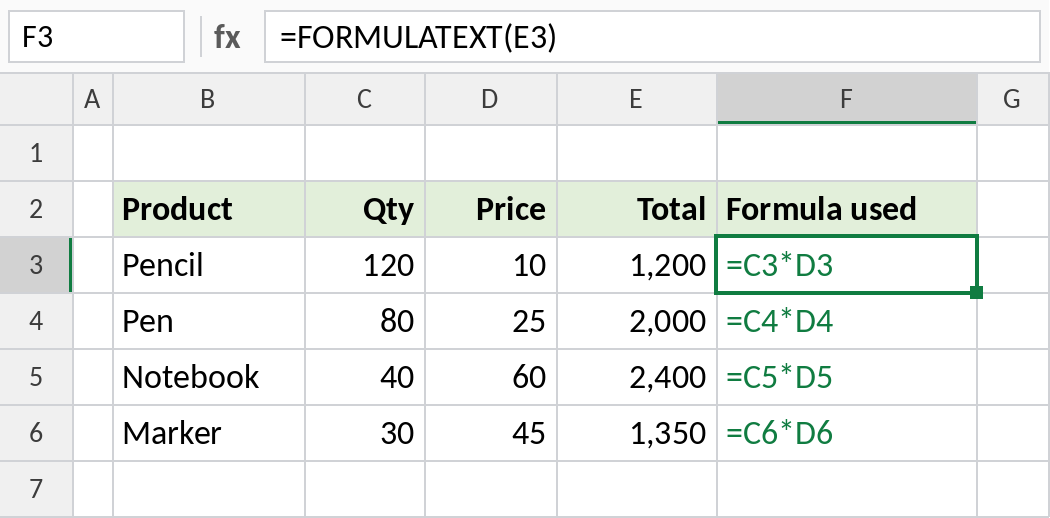
F3 shows =C3*D3. Change the formula in E3 and F3 updates too.
Document a summary, including typed values
FORMULATEXT returns #N/A for a cell without a formula. IFERROR turns that into a clear label:
=IFERROR(FORMULATEXT(C3),"Typed value")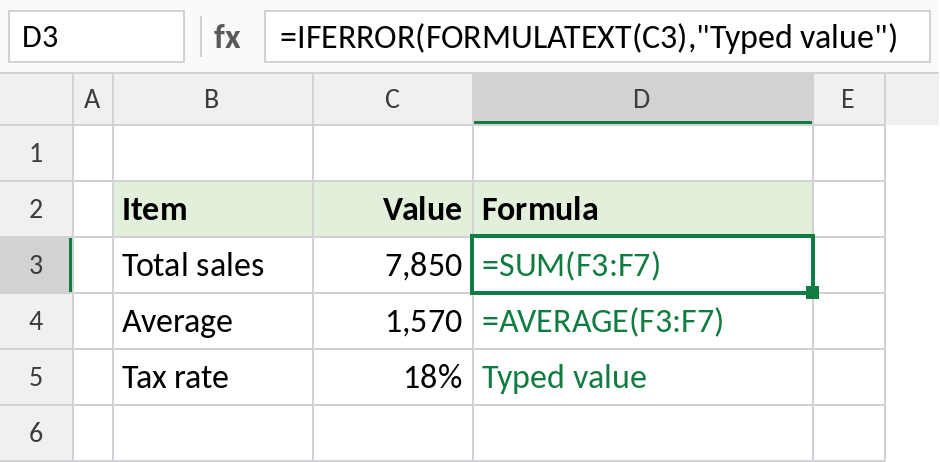
The totals show their formulas, and the tax rate, typed in by hand, shows Typed value. A quick way to spot hard-coded numbers in a model.
Related tools
| Tool | Does |
|---|---|
=ISFORMULA(C3) |
TRUE if C3 has a formula |
| Ctrl + ` | Shows every formula on the sheet, then switches back |
| Formulas → Show Formulas | The same as Ctrl + |
Notes
- A cell without a formula returns
#N/A. - FORMULATEXT shows the formula exactly as written, including spaces and line breaks.
- Use ISFORMULA in conditional formatting to highlight every formula cell on a sheet.
Common errors
| Problem | Cause | Fix |
|---|---|---|
#N/A |
The cell has no formula, or it refers to a closed workbook | Wrap in IFERROR |
| Formula too long | Over 8,192 characters | Rare; split the formula |
Practice file
Both examples in one workbook.