The Excel MAXA function returns the largest value in a range, like MAX, but it also counts text and TRUE/FALSE. Text and FALSE count as 0, and TRUE counts as 1.
PurposeLargest value, counting text and logicals
ReturnsA number
Available inAll Excel versions, Excel for the web, Google Sheets
value1 |
The first value or range. |
|---|---|
value2, ... optional |
More values or ranges. |
Table of Contents
Basic example: MAX vs MAXA
These winter temperatures are all below zero, and one cell says No data. MAX ignores the text, but MAXA counts it as 0:
=MAXA(B3:B7)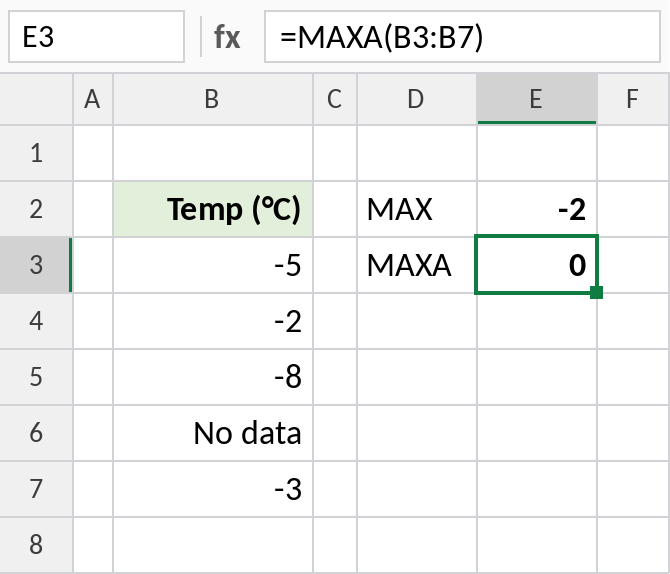
MAX returns the warmest reading, -2. MAXA returns 0, because the text counts as zero. Here MAX is the right choice; the example shows why the difference matters.
Check whether anything is TRUE
With TRUE/FALSE values, MAXA returns 1 if at least one is TRUE. MAX would ignore them and return 0:
=MAXA(C3:C6)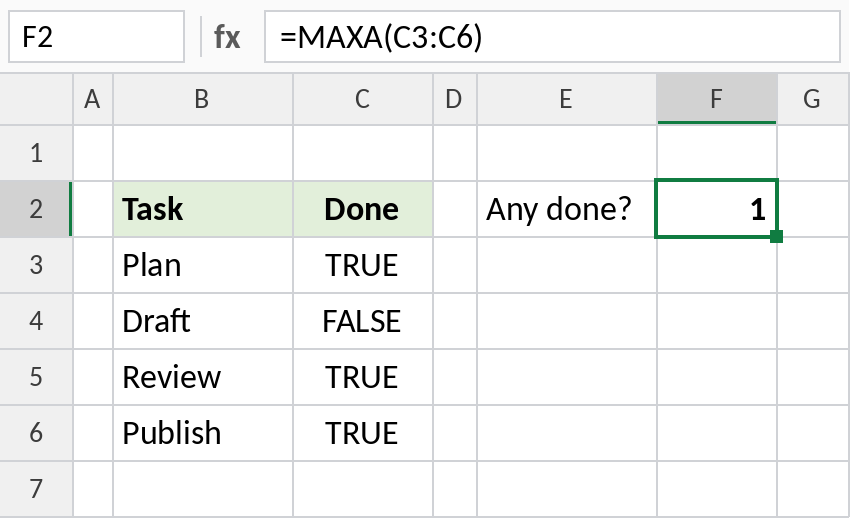
Three tasks are done, so the result is 1.
How MAX and MAXA treat values
| Value | MAX | MAXA |
|---|---|---|
| Numbers | Counted | Counted |
| Text in a range | Ignored | Counted as 0 |
| TRUE | Ignored | Counted as 1 |
| FALSE | Ignored | Counted as 0 |
| Empty cells | Ignored | Ignored |
Notes
- Empty cells are ignored by both MAX and MAXA.
- For normal number lists, use MAX. MAXA is for ranges where text or logicals should count.
- MINA is the matching function for the smallest value.
Common errors
| Problem | Cause | Fix |
|---|---|---|
| Result is 0 unexpectedly | Text in the range counted as 0 | Use MAX instead |
Practice file
Both examples plus the comparison table.