How to Create AI Videos for Free (2026): Tools, Real Limits and a 5-Step Method
You can make AI videos for free in 2026, but every free plan limits something: clip length, number of clips, watermarks or commercial use. The best free setup today is a free AI chat for the script, Google Flow for the video clips (50 free credits a day) and CapCut for voice and editing. OpenAI’s Sora is no longer an option, because its app shut down in April 2026.
Which free AI video generators work in 2026?
Google Flow gives the most useful free allowance, because its 50 credits refill every day. Most other tools give one-time credits, very short clips or watermarked, non-commercial videos. The table shows what each free plan includes, based on each company’s own pages, checked between September and November 2026.
| Tool | Free allowance | Limits to know | Best for |
|---|---|---|---|
| Google Flow (Veo) | 100 credits to start, then 50 credits a day; a Veo 3.1 Lite clip costs 10 | About 8-second clips; no 1080p upscaling; credits don’t roll over | The best free video quality |
| CapCut | No limit published | Works best with your own footage and scripts | Script-to-video, voiceover and editing |
| Runway | 125 one-time credits (about two 5-second clips) | Credits don’t renew; watermark on free videos | Testing before you pay |
| Canva | Up to 20 AI uses a month | 4-second clips, no sound on the free plan | Short clips inside designs |
| Adobe Express | 2 generations in total | 5-second clips; never resets | A quick test |
| Hailuo | One-time welcome credits | Credits expire after 3 days; watermark; no commercial use | Image-to-video tests |
| Kling | No free daily credits now | Daily login credits are for subscribers; free use runs on bought credits | Paid users |
What happened to Sora? OpenAI shut down the Sora app and website on 26 April 2026, so it is no longer a way to make free AI videos. In the Gemini app, video creation with Gemini Omni needs a paid Google AI plan.
What is the best free AI video workflow?
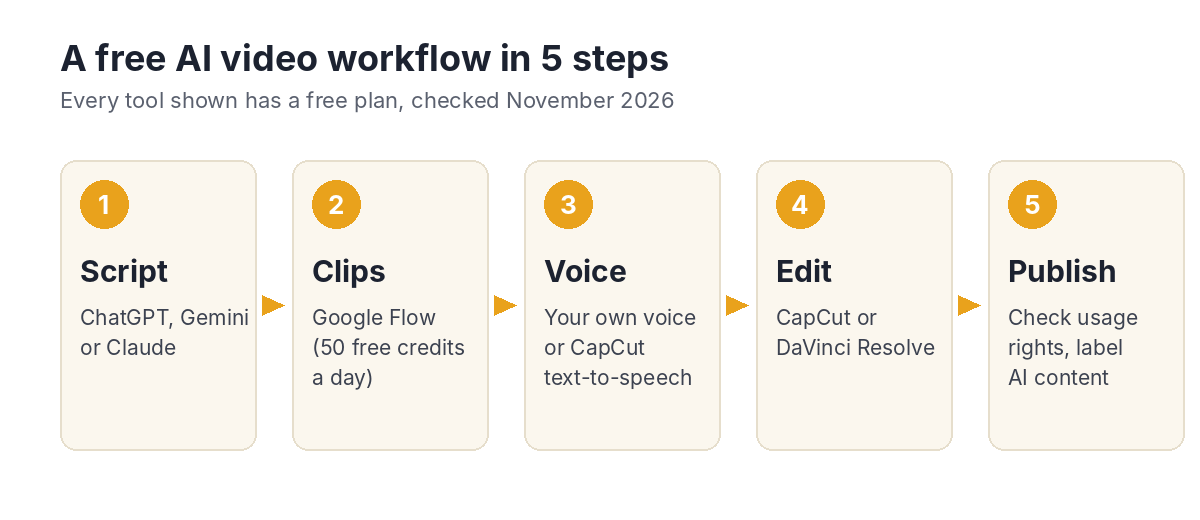
Split the job into five steps and use the best free tool for each one. No single free tool does everything well, but together they can produce a complete short video at no cost.
Step 1: Write the script and shot list
Use the free plan of ChatGPT, Gemini or Claude to write a short script and split it into shots of about 8 seconds, because that’s the length of a free Flow clip.
Step 2: Generate the video clips
Open Google Flow, sign in with your Google account and use text-to-video for each shot in your list. With 50 credits a day and 10 credits per Veo 3.1 Lite clip, you can make about 5 clips a day, so plan an 8-shot video over two days.
Step 3: Add the voiceover
Record your own voice for the most natural result, or use CapCut’s text-to-speech. Your own voice also makes the video feel less generic, which helps on YouTube.
Step 4: Edit and add captions
Put the clips in order in CapCut or DaVinci Resolve (both free), add the voiceover, trim each clip to match the narration and add automatic captions. Most viewers watch Shorts without sound, so captions matter.
Step 5: Check the rights and publish
Before you upload, check that each tool’s free plan allows the way you’ll use the video, especially if your channel earns money. On YouTube, turn on the “altered or synthetic content” label for realistic AI footage.
How do you write a good prompt for an AI video clip?
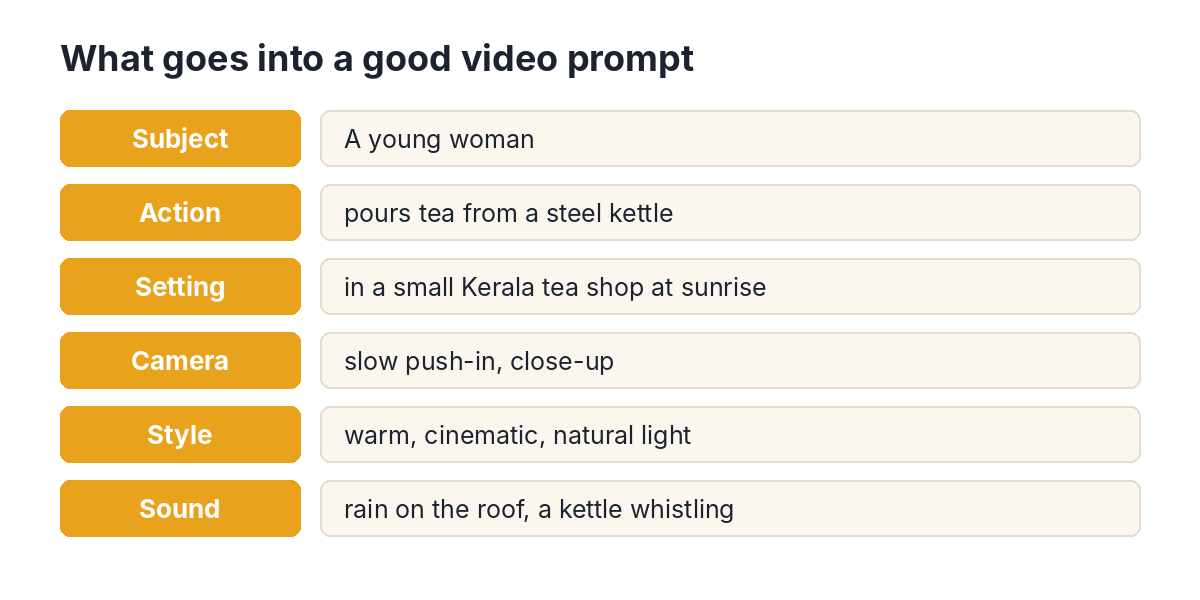
A good video prompt describes six things: the subject, the action, the setting, the camera movement, the visual style and the sound. Short, specific prompts work better than long stories, because each clip is only a few seconds long.
| Vague prompt | Clear prompt |
|---|---|
| A tea shop in Kerala. | A young woman pours tea from a steel kettle in a small Kerala tea shop at sunrise. Slow push-in, close-up. Warm, cinematic, natural light. Sound of rain on the roof and a kettle whistling. |
| Someone using Excel. | Close-up of hands typing on a laptop showing a colourful spreadsheet chart, in a bright home office. Camera slowly pans left. Clean, modern, soft daylight. Quiet keyboard clicks. |
Avoid asking for real people, brand logos or copyrighted characters. Most tools block them, and they can cause problems when you publish.
How many AI videos can you make for free?
With Google Flow’s free plan, you can make about 5 short clips a day, or roughly 40 seconds of new footage. That’s enough for one or two YouTube Shorts a week if you mix AI clips with your own footage, screen recordings or images.
| Google Flow free plan | Amount |
|---|---|
| Credits to start | 100 |
| Credits every day | 50 (no rollover) |
| Cost of one Veo 3.1 Lite clip | 10 credits |
| Clips a day | About 5 |
| New footage a day | About 40 seconds |
What is not free in AI video?
Free plans almost always hold back the things you need for a professional result. Before you build a channel on a free tool, check these five limits.
- Commercial use — Hailuo, Kling and HeyGen’s free outputs are not for commercial use.
- Watermarks — many free videos carry a visible mark. Google adds an invisible SynthID watermark to every Flow video.
- Resolution — 1080p and 4K are usually paid features.
- Credits that expire — welcome credits can vanish within days, and daily credits don’t roll over.
- Talking avatars — HeyGen’s free plan gives 3 one-minute videos a month for personal use only, and Synthesia’s free plan doesn’t allow downloads.
When should you pay for AI video?
Upgrade when you publish AI video every week and earn from it. The cheapest step up is Google AI Plus at ₹399 a month, which adds monthly Flow credits and Gemini Omni video in the Gemini app. Compare the plans on my Google Gemini page.
FAQ
What is the best free AI video generator in 2026?
Google Flow is the best free option for most people, because it gives 50 free credits every day, which is about 5 short Veo clips.
Is Sora free?
No. OpenAI shut down the Sora app and website on 26 April 2026.
Can I use free AI videos on YouTube?
Often yes, but check each tool’s terms first: some free plans don’t allow commercial use. Turn on YouTube’s label for realistic altered or synthetic content.
Can I make AI videos without a watermark for free?
CapCut says its generator adds no watermark. Google Flow always adds an invisible SynthID watermark, and its visible watermark is a setting.
How long can a free AI video be?
Each free clip is usually 4 to 8 seconds long. To make a longer video, join several clips together in an editor and add a voiceover.