To get the month name from a date in Excel, use TEXT with the format code "mmmm" for the full name or "mmm" for the short name. To only change how a date looks, use a custom number format instead.
ProblemMonth name from a date or a month number
Functions usedTEXT, DATE
Works inAll Excel versions
Full and short month name
=TEXT(B3,"mmmm")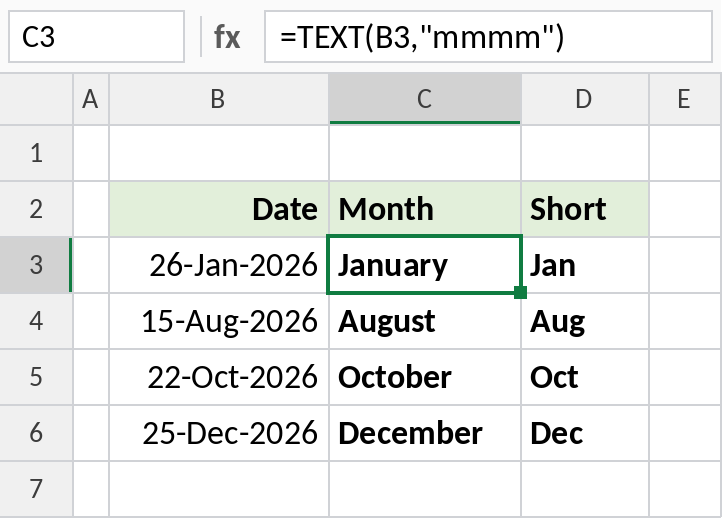
Column D uses "mmm" for the three-letter name. Use "mmm-yy" for Oct-26 or "mmmm yyyy" for October 2026.
How the formula works
- TEXT turns a number, here a date, into text using a format code.
"mmmm"is the format code for the full month name,"mmm"for the short name.- The result is text, so it can be joined into sentences, such as
="Report for "&TEXT(B3,"mmmm").
Month name from a month number
If you have only the number 1 to 12, build a date with it first:
=TEXT(DATE(2026,B3,1),"mmmm")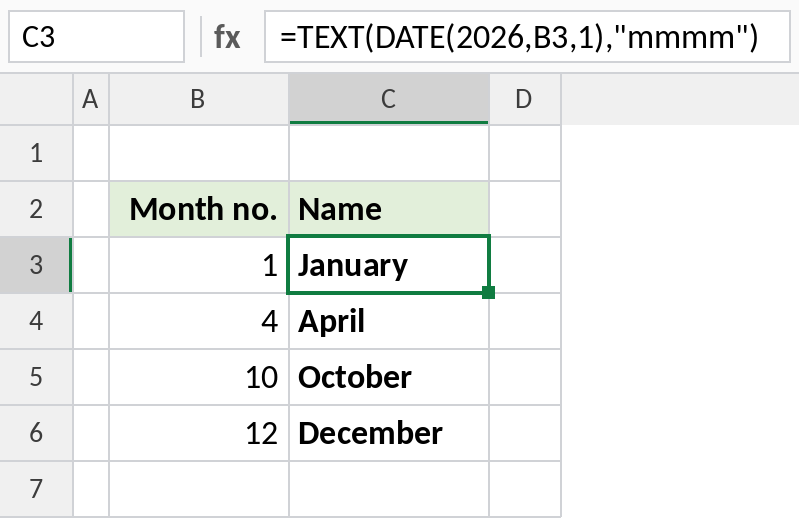
Any year works, because only the month is shown.
Which formula to use
| To get | Formula |
|---|---|
| Full name: October | =TEXT(B3,"mmmm") |
| Short name: Oct | =TEXT(B3,"mmm") |
| Month and year: Oct-2026 | =TEXT(B3,"mmm-yyyy") |
| Month number: 10 | =MONTH(B3) |
| From a month number | =TEXT(DATE(2026,B3,1),"mmmm") |
| Current month | =TEXT(TODAY(),"mmmm") |
Notes
- TEXT returns text. To keep the real date but show only the month, use Format Cells → Custom →
mmmm. - Format codes follow your Windows language. In some languages, use the local letters for month.
- Text month names sort alphabetically (April first). Sort by the date or the month number instead.
Common errors
| Problem | Cause | Fix |
|---|---|---|
| Shows January for every row | The cell has a month number, not a date | Use TEXT(DATE(2026,B3,1),"mmmm") |
#VALUE! |
Date stored as text | Convert it to a real date |
| Shows mmmm as text | Format code in a different language | Use your language's format letters |
Practice file
Dates and month numbers with both formulas.