Google Sheets can create a personalised WhatsApp message for every person on a list, and a link that opens it in WhatsApp Web ready to send. It needs two formulas and no add-on, and it works for numbers that aren’t saved in your contacts.
Functions& (join text) and HYPERLINK
OpensWhatsApp Web in your browser
Good forPayment reminders, renewals, event updates
Video
The data
A list of friends who owe money to a health club: name in column B, phone number in C and pending amount in D. Write each phone number with the country code and no + or spaces, for example 919876500001 for an Indian number.
Step 1: Build the message
In E3, join the text with the name and amount:
="Hi "&B3&", "&TEXT(D3,"#,##0")&" is due. Please pay as soon as possible."Copy it down. Every row now has its own message with the right name and amount. TEXT adds the thousands separator, so 1500 shows as 1,500.
Step 2: Make the WhatsApp link
In F3:
=HYPERLINK("https://web.whatsapp.com/send?phone="&C3&"&text="&E3,"Send Message")Copy it down. Each cell shows a blue Send Message link.
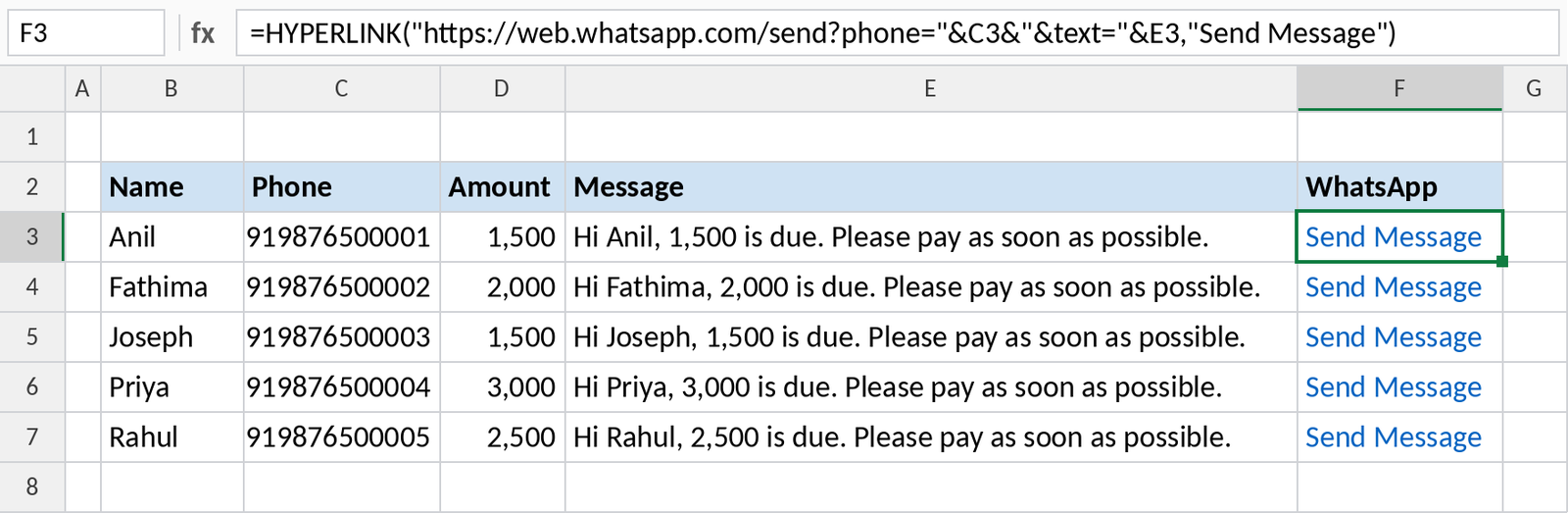
Step 3: Send
- Click a Send Message link. Google Sheets shows the link; click it again to open it.
- A new browser tab opens WhatsApp Web with the number and message filled in.
- The first time, scan the QR code with WhatsApp on your phone (Linked devices). You won’t need to again unless you log out or change computers.
- Check the message and press Send.
Things to know
- Each message still needs one click on Send. That keeps it within normal WhatsApp use.
- If the message has characters like &, # or line breaks, wrap it in
ENCODEURL:…&"&text="&ENCODEURL(E3). - To open the WhatsApp phone app instead of WhatsApp Web, use
=HYPERLINK("https://wa.me/"&C3&"?text="&E3,"Send Message"). - Don’t use this for bulk promotions to people who haven’t agreed to hear from you. WhatsApp can block numbers that are reported as spam.