How to Create AI Videos: A Step-by-Step Workflow (2026)
To create an AI video, decide what kind of video you’re making, write the script, generate the voice, create the visuals, then edit and publish. Each step has its own AI tool: ChatGPT, Gemini or Claude for the script, ElevenLabs for the voice, Google Flow or HeyGen for the visuals, and CapCut for editing. A complete setup costs anywhere from ₹0 to a few thousand rupees a month, depending on how much you publish.
What kind of AI video do you want to make?
There are three main kinds of AI video, and each one needs different tools. Choose the type first, because it decides your tools and your budget.
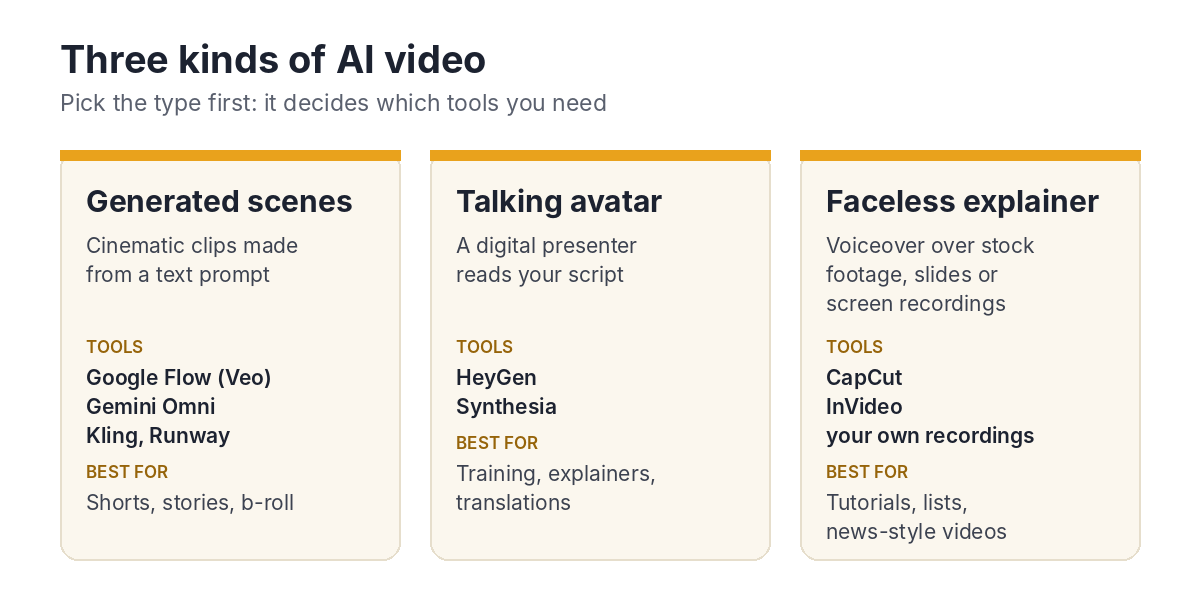
| Type | What it is | Main tools | Best for |
|---|---|---|---|
| Generated scenes | Short cinematic clips created from a text prompt | Google Flow (Veo), Gemini Omni, Kling, Runway | Shorts, stories, b-roll |
| Talking avatar | A digital presenter reads your script on camera | HeyGen, Synthesia | Training, explainers, videos in many languages |
| Faceless explainer | A voiceover over stock footage, slides or screen recordings | CapCut, InVideo, your own screen recordings | Tutorials, top-10 lists, news-style videos |
How do you create an AI video, step by step?
Every AI video follows the same six steps, whatever its type. Do them in order: a good script makes every later step easier.
Step 1: Plan the video
Decide the topic, the audience, the length and the platform. A YouTube Short is under 60 seconds and vertical; a tutorial can be 5 to 10 minutes and horizontal. Write this down before you open any AI tool.
Step 2: Write the script with AI
Use ChatGPT, Gemini or Claude to draft the script, then rewrite it in your own words. Ask for short sentences that are easy to say out loud, and a shot list that matches the script.
For help choosing a writing tool, see ChatGPT vs Gemini vs Claude.
Step 3: Create the voiceover
Record your own voice, or use an AI voice tool such as ElevenLabs. ElevenLabs supports 70+ languages, including Hindi and Malayalam, and can clone your own voice on paid plans. Its free plan gives 10,000 credits a month, but commercial use needs the Starter plan or higher.
Tip for multi-language channels: keep all on-screen text in English. You can then reuse the same video with English, Hindi, Malayalam or other voiceovers, and only re-record the audio.
Step 4: Create the visuals
Make the visuals with the tool that matches your video type:
- Generated scenes — create each shot in Google Flow. The free plan gives 50 credits a day, and Google AI Plus (₹399 a month) adds monthly Flow credits and Gemini Omni in the Gemini app.
- Talking avatar — paste your script into HeyGen or Synthesia, choose a presenter or create your own avatar, and generate the video.
- Faceless explainer — record your screen, or use CapCut or InVideo to match stock footage and images to your script.
Step 5: Edit, add captions and music
Put everything together in CapCut or DaVinci Resolve. Match the visuals to the voiceover, cut any pauses, add automatic captions and add background music from a royalty-free library. Check every caption: AI captions often get names and technical terms wrong.
Step 6: Make a thumbnail and publish
Create a thumbnail with a clear face or object and 3 to 4 large words. When you upload realistic AI footage to YouTube, turn on the “altered or synthetic content” label. Check that every tool you used allows commercial use on your plan.
Which AI video tools should you use?
You don’t need every tool. Pick one tool per step, start with its free plan, and upgrade only the step that holds you back. Prices below are monthly, checked in November 2026.
| Step | Tool | Free plan | Paid plans from |
|---|---|---|---|
| Script | ChatGPT, Gemini or Claude | Yes | ₹399 (ChatGPT Go or Google AI Plus) |
| Voice | ElevenLabs | 10,000 credits; no commercial use | $6 (Starter); $22 (Creator, with professional voice cloning) |
| Generated scenes | Google Flow | 50 credits a day | ₹399 (Google AI Plus) |
| Generated scenes | Kling | No free daily credits | $10 (Standard) |
| Talking avatar | HeyGen | 3 watermarked videos, 1 minute each | $29 (Creator: 600 credits, 175+ languages, no watermark) |
| Talking avatar | Synthesia | 10 minutes a month, no downloads | $19 ($14 billed yearly) |
| Editing | CapCut or DaVinci Resolve | Yes | Optional |
How much does it cost to make AI videos every month?
You can start at ₹0 and reach a professional setup for about ₹4,000 to ₹5,250 a month. Rupee amounts for dollar-priced tools are approximate, at about ₹95 to the dollar, and taxes may be added at checkout.
| Budget | Setup | About per month |
|---|---|---|
| Free | Free AI chat + Google Flow free plan + your own voice + CapCut | ₹0 |
| Starter | Google AI Plus (₹399) + ElevenLabs Starter ($6) | About ₹1,000 |
| Regular creator | Google AI Pro (₹1,950) + ElevenLabs Creator ($22) | About ₹4,000 |
| Avatar videos | ChatGPT Go (₹399) + HeyGen Creator ($29) + ElevenLabs Creator ($22) | About ₹5,250 |
What mistakes should you avoid?
Most AI videos fail for the same few reasons, and none of them is the AI tool itself. Avoid these and your videos will already stand out.
- Publishing the AI script as it is — rewrite it in your own voice, and add your own examples and opinions.
- Using only AI clips — mix in your own footage, screen recordings or photos so the video feels real.
- Skipping the rights check — free plans often don’t allow commercial use.
- Not labelling realistic AI content — YouTube asks you to label it.
- Making the video too long — cut every pause and repeated line.
To start without spending anything, follow the free method in How to Create AI Videos for Free.
FAQ
What is the easiest way to create an AI video?
Write a script with ChatGPT, Gemini or Claude, record your voice, and turn it into a faceless explainer with stock footage or screen recordings in CapCut. It’s free and needs no special skills.
Can I make AI videos in Malayalam or Hindi?
Yes. ElevenLabs supports Hindi, Malayalam and many other Indian languages for voiceovers, and HeyGen’s Creator plan covers 175+ languages and dialects.
Can I monetise AI videos on YouTube?
Yes, if the videos add real value and you have commercial rights for every tool you used. Label realistic AI content, and avoid mass-produced, repetitive videos.
Which AI tool makes talking avatar videos?
HeyGen and Synthesia are the two main tools. HeyGen’s Creator plan costs $29 a month, and Synthesia’s Starter plan costs $19 a month, or $14 billed yearly.
Sources
- ElevenLabs pricing (October 2026)
- ElevenLabs free plan and commercial use
- ElevenLabs — languages and voices
- ElevenLabs in India: Hindi and Malayalam voices
- HeyGen — pricing
- HeyGen pricing checked 11 November 2026
- Synthesia free and Starter plans
- Kling plans
- Scrimba — Free AI video generators, re-checked (2026)
- Google Labs — Flow plans and credits
- Rupee to dollar rate used for estimates (about ₹95–96)