
Best AI Video Generators in 2026: Veo, Kling, Runway, Seedance and More
Google Veo 3.1 is the best AI video generator for most people in 2026, and you can use it for free in Google Flow (50 credits a day). Kling 4.0 makes the longest clips, up to 30 seconds. Runway gives the most editing control, Seedance is strong for multi-shot scenes with sound, and HeyGen is the best choice for talking avatar videos. OpenAI’s Sora is no longer available.
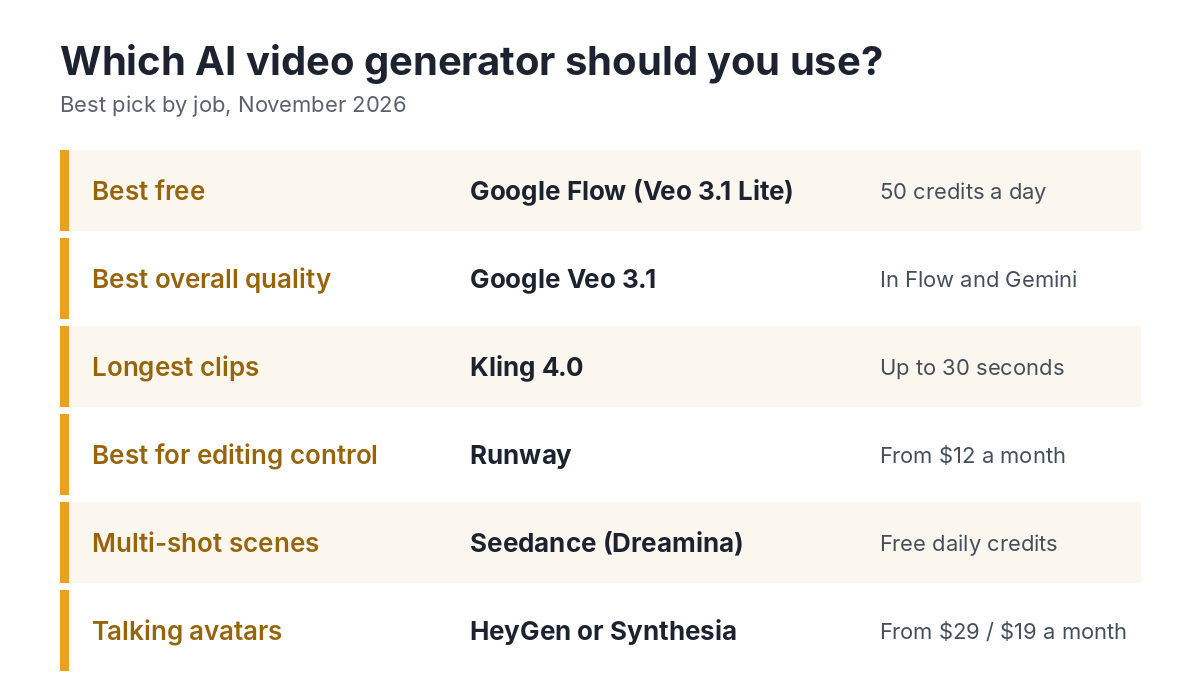
How do the top AI video generators compare?
This table compares the main tools on their latest model, longest clip, free plan and starting price. Prices are in US dollars because these tools are sold in dollars, except Google’s plans, which are priced in rupees in India.
| Tool | Latest model | Free plan | Paid from | Best for |
|---|---|---|---|---|
| Google Flow / Gemini | Veo 3.1, Gemini Omni | Flow: 100 credits to start, then 50 a day | ₹399 (Google AI Plus) | Overall quality, free use |
| Kling | Kling 4.0 (announced 27 Sep 2026) | Limited; daily credits now tied to paid plans | About $10 a month | Long clips, realistic motion |
| Runway | Gen-4.5 | 125 one-time credits | $12 a month billed yearly ($15 monthly) | Editing control, filmmakers |
| Seedance (Dreamina) | Seedance 2.5 | Free daily credits | Varies by region and offer | Multi-shot scenes with sound |
| Hailuo (MiniMax) | Hailuo | One-time welcome credits | Varies | Image-to-video tests |
| HeyGen | Avatar videos | 3 one-minute videos a month, watermarked | $29 (Creator) | Talking presenters, 175+ languages |
| Synthesia | Avatar videos | 10 minutes a month, no downloads | $19 ($14 billed yearly) | Training and business videos |
Google Veo 3.1: best overall
Veo 3.1 is Google’s video model, and many 2026 comparisons rate it the best overall for cinematic quality with generated sound. You can use it in Google Flow, where the free plan gives 50 credits a day, enough for about 5 clips with Veo 3.1 Lite. Paid Google AI plans add more credits and Gemini Omni video in the Gemini app.
- Strengths — realistic scenes, sound effects and dialogue, a real free plan.
- Limits — free clips are about 8 seconds long; 1080p upscaling needs a paid plan.
Kling 4.0: best for longer clips
Kling, made by Kuaishou, is often rated close to Veo for realistic motion, and it’s usually cheaper per clip. Kling 4.0 was announced on 27 September 2026 and rolled out in stages through October, with clips up to 30 seconds and up to 10 keyframes to guide the action. A faster Kling 4.0 Flash version makes shorter 720p clips.
- Strengths — the longest clips, strong motion, good value.
- Limits — free daily credits are now mainly for subscribers, and new features reach top plans first.
Runway: best for editing control
Runway is built for creators who want to control each shot. Its Gen-4.5 model costs 12 credits per second, so the Standard plan’s 625 monthly credits give about 52 seconds of Gen-4.5 video. Runway also lets you use other models, such as Veo 3.1, Seedance and Kling, from the same account.
- Strengths — shot control, editing tools, many models in one place.
- Limits — credits run out quickly; the free plan is a one-time 125 credits.
Seedance: best for multi-shot scenes
Seedance is ByteDance’s video model, available in Dreamina (from the makers of CapCut). Reviews in 2026 rate Seedance highly for multi-shot storytelling and for sound and lip-sync. Dreamina gives free daily credits, which makes it easy to test before you pay.
HeyGen and Synthesia: best for talking avatar videos
If you need a presenter reading a script, use an avatar tool instead of a scene generator. HeyGen’s Creator plan costs $29 a month and covers 175+ languages, which suits training and multi-language videos. Synthesia starts at $19 a month ($14 billed yearly) and is popular for company training.
For a full avatar and voice workflow, see How to Create AI Videos: Step by Step.
Which AI video generator should you choose?
| You want to… | Use |
|---|---|
| Try AI video for free | Google Flow, then Dreamina’s daily credits |
| Make YouTube Shorts and Reels | Google Flow or Kling, edited in CapCut |
| Make longer, continuous shots | Kling 4.0 |
| Control every shot like a film | Runway |
| Make training or explainer videos with a presenter | HeyGen or Synthesia |
| Make tutorials with voiceover | Your own screen recordings plus an AI voice; see How to Create AI Videos for Free |
What should you check before paying?
- Cost per usable clip — you’ll usually generate two or three versions before one works, so credits go faster than they look.
- Commercial use — several free plans don’t allow it; check before you publish on a monetised channel.
- Watermarks and resolution — 1080p, 4K and watermark-free downloads are often paid features.
- Labels — turn on YouTube’s “altered or synthetic content” label for realistic AI footage.
How were these tools chosen?
These picks are based on each tool’s published features and prices, its free plan and 2026 comparisons from several review sites. No company paid to be listed, and the page has no affiliate links. Video models change every few months, so this page is rechecked every 3 months.
FAQ
What is the best AI video generator in 2026?
Google Veo 3.1 is the best overall for most people, and it’s free to try in Google Flow. Kling 4.0 is best for longer clips, and Runway for editing control.
What is the best free AI video generator?
Google Flow, because its 50 free credits refill every day. Dreamina’s daily credits for Seedance are a good second option.
Is Sora still available?
No. OpenAI shut down the Sora app and website on 26 April 2026.
Which AI video generator makes the longest clips?
Kling 4.0, which makes clips up to 30 seconds. Most other tools make clips of 4 to 10 seconds that you join in an editor.
Sources
- Pixflow — Best AI video generators compared (2026)
- Veo 3.1 vs Runway Gen-4.5 vs Kling 3.0; Sora discontinued
- Kling 4.0 announcement date (27 September 2026)
- Kling 4.0 and 4.0 Flash: launch timing
- Kling 4.0: 30-second clips and 10 keyframes
- Runway — pricing and credits
- Runway plans and the free plan’s one-time credits
- Dreamina — free daily credits
- Google Labs — Flow plans and free credits
- HeyGen pricing, checked 11 November 2026
- Synthesia free and Starter plans