In Excel you divide and then apply the Percent Style (Ctrl + Shift + 5), with no need to multiply by 100. Here are the formulas for percentage of a total, percentage change, adding or removing a percentage, and working backwards.
Quick reference
| To find | Formula | Example |
|---|---|---|
| Percentage of a total | =Part/Total |
51,296 of 80,000 → 64.12% |
| A percentage of a number | =Total*Percent |
73% of 80,000 → 58,400 |
| The total from a part | =Part/Percent |
26,808 is 33.51% → 80,000 |
| Percentage change | =(New-Old)/Old |
5,000 → 6,300 → 26% |
| Increase by a percentage | =Amount*(1+Percent) |
5,000 + 6% → 5,300 |
| Decrease by a percentage | =Amount*(1-Percent) |
700 − 6% → 658 |
| Original before an increase | =Amount/(1+Percent) |
₹31,108 incl. 18% GST → ₹26,362 |
Percentage of a total
A stadium holds 80,000 people and 51,296 seats are filled. With the capacity in C2 and the crowd in C3:
=C3/C2The result is 0.6412. Click Home → % to show it as 64.12%. Don't also multiply by 100, or you'll see 6412%.


For each row's share of a column total, lock the total with $: =C3/$C$10. See percentage of total.
Working backwards
If 73% of seats are filled: =80000*73% gives 58,400 people. If 26,808 people fill 33.51%: =26808/33.51% gives a capacity of 80,000.


Percentage change
=(C3-C2)/C2An investment growing from 5,000 to 6,300 is a 26% increase. Sales falling from ₹4,932 to ₹3,717 is −24.64%. =C3/C2-1 gives the same answer.


If the old value can be 0, avoid #DIV/0! with =IF(C2=0,"",(C3-C2)/C2). More in percentage change.
Add or subtract a percentage
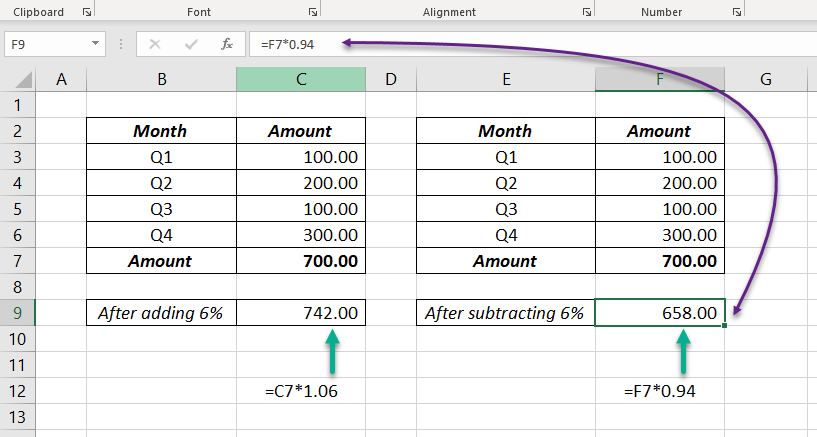
These three formulas all add 6% to 700 and give 742:
| Formula | Why it works |
|---|---|
=C7+C7*6% |
The amount plus 6% of it |
=C7+C7*0.06 |
6% written as a decimal |
=C7*(1+6%) |
106% of the amount: the shortest |
To subtract, use =C7*(1-6%), which gives 658. To raise a whole column at once without formulas, use Paste Special → Multiply.

A common mistake
Taking 10% off and then adding 10% back doesn't return the original: 1,000 → 900 → 990. To undo an increase, divide: =Amount/(1+10%). This is how you find the price before GST; see the GST calculator.