To calculate age from a date of birth in Excel, use DATEDIF with the "y" unit. It counts complete years, so a person is a year older only on their birthday, just like a real age.
Age in completed years
Put the date of birth first and today's date second. Here the "as on" date is in G2 so the result stays fixed:
=DATEDIF(C3,$G$2,"y")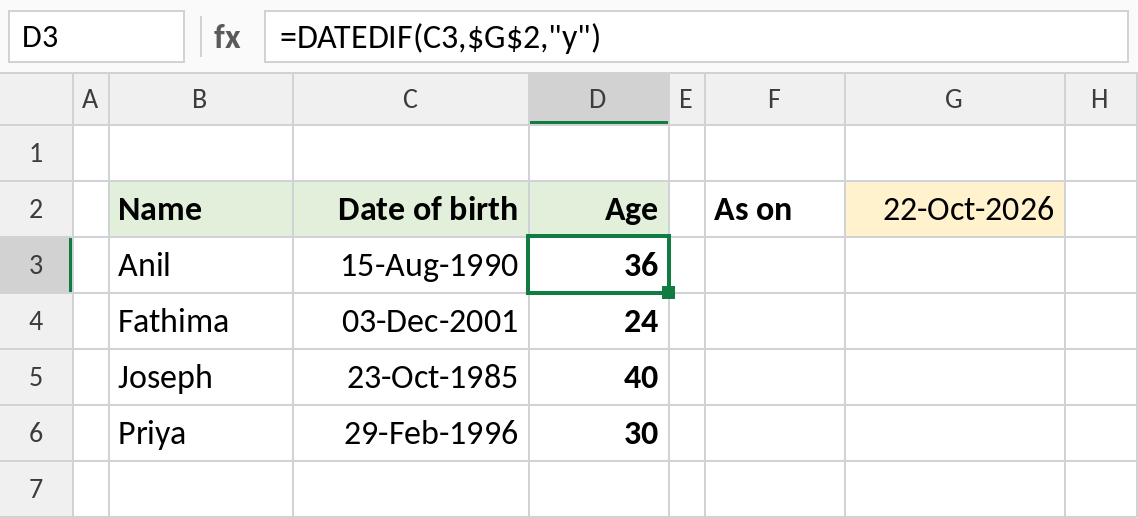
Joseph was born on 23-Oct-1985, so on 22-Oct-2026 he is still 40. His birthday is one day away. Replace $G$2 with TODAY() and the ages update every day.
How the formula works
- DATEDIF(start, end, "y") counts the complete years between the two dates.
- A year is counted only when the end date reaches the same day and month as the birth date.
- "ym" counts the months left over after the complete years, and "md" the days left over after the complete months.
Age in years, months and days
Join three DATEDIF results: "y" for years, "ym" for the months after the last birthday and "md" for the days after that:
=DATEDIF(C3,$G$2,"y")&" years, "&DATEDIF(C3,$G$2,"ym")&" months, "&DATEDIF(C3,$G$2,"md")&" days"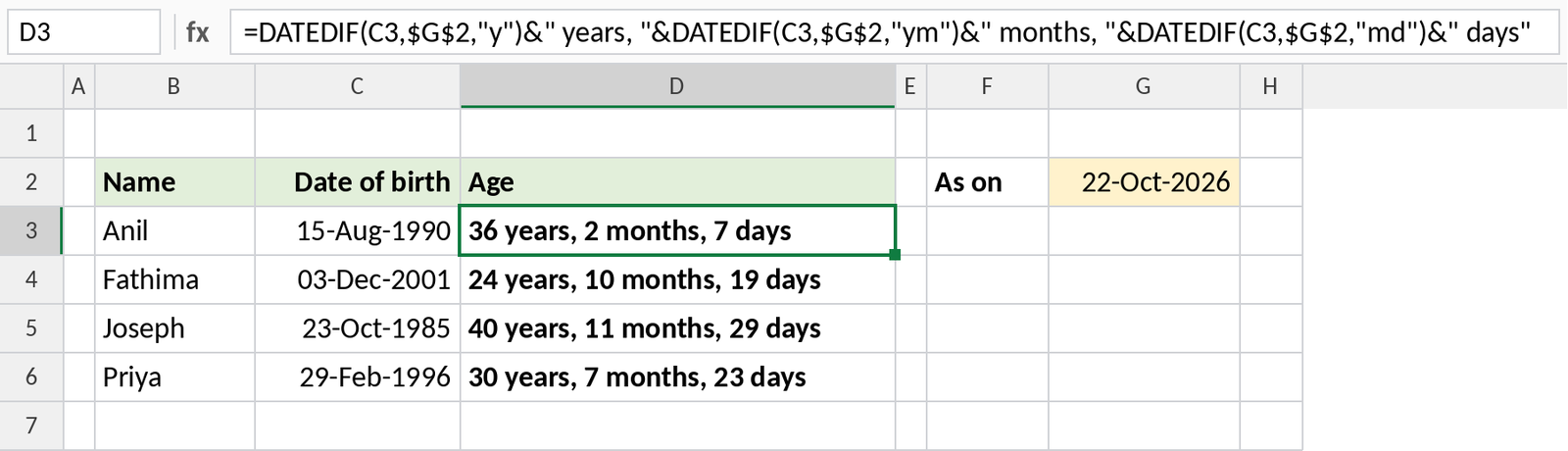
Anil, born 15-Aug-1990, is 36 years, 2 months, 7 days old.
Which formula to use
| To get | Formula |
|---|---|
| Age in years | =DATEDIF(C3,TODAY(),"y") |
| Age in months | =DATEDIF(C3,TODAY(),"m") |
| Age in days | =TODAY()-C3 |
| Age with decimals | =YEARFRAC(C3,TODAY(),1) |
| Age on a given date | =DATEDIF(C3,"31-Mar-2027","y") |
| Age next birthday | =DATEDIF(C3,TODAY(),"y")+1 |
Notes
- DATEDIF doesn't appear in Excel's function list or show tooltips, but it works in every version.
- Avoid
=(TODAY()-C3)/365: leap years make it wrong around birthdays. - If the result looks like a date, format the cell as General.
Common errors
| Problem | Cause | Fix |
|---|---|---|
#NUM! |
Date of birth is after the end date | Check the dates, or the order of the arguments |
#VALUE! |
The date of birth is text, not a real date | Convert it with DATEVALUE or Text to Columns |
| Age is one year too high | Using YEAR(TODAY())-YEAR(C3) | Use DATEDIF, which waits for the birthday |
Just need the number? Use the age calculator here, or the date difference calculator on Quick Easy Calculators, our sister site.
Practice file
Both examples with live formulas. Change the as-on date in G2 and watch the ages update.