India's financial year runs from April to March, so January 2026 belongs to FY 2025-26. Subtract 1 from the year when the month is before April, and you have the financial year for any date.
ProblemFinancial year and quarter for an April–March year
Functions usedYEAR, MONTH, RIGHT, MOD, ROUNDUP
Works inAll Excel versions
Financial year as FY 2026-27
="FY "&(YEAR(B3)-(MONTH(B3)<4))&"-"&RIGHT(YEAR(B3)-(MONTH(B3)<4)+1,2)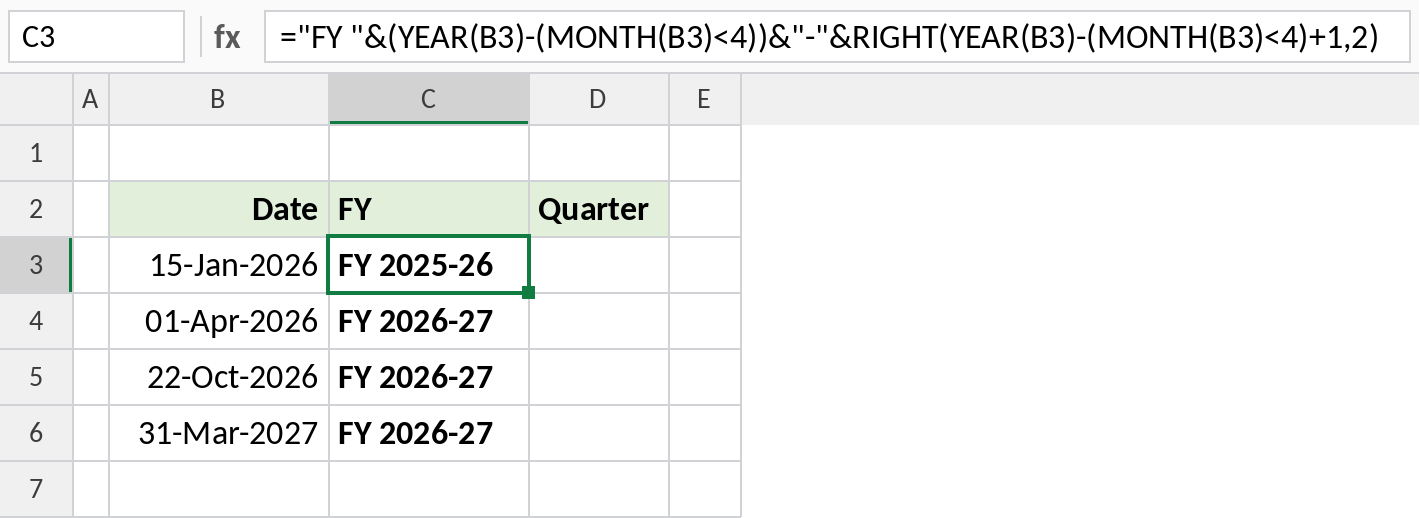
15-Jan-2026 is in FY 2025-26 and 01-Apr-2026 starts FY 2026-27.
How the formula works
MONTH(B3)<4is TRUE (1) for January to March and FALSE (0) for April to December.YEAR(B3)-(MONTH(B3)<4)is the year the financial year started: 2025 for January 2026.RIGHT(…+1,2)adds the last two digits of the next year, giving 2025-26.- For the quarter,
MOD(MONTH(B3)-4,12)+1numbers the months from April = 1 to March = 12, and dividing by 3 and rounding up gives 1 to 4.
Financial-year quarter
April to June is Q1 and January to March is Q4:
="Q"&ROUNDUP((MOD(MONTH(B3)-4,12)+1)/3,0)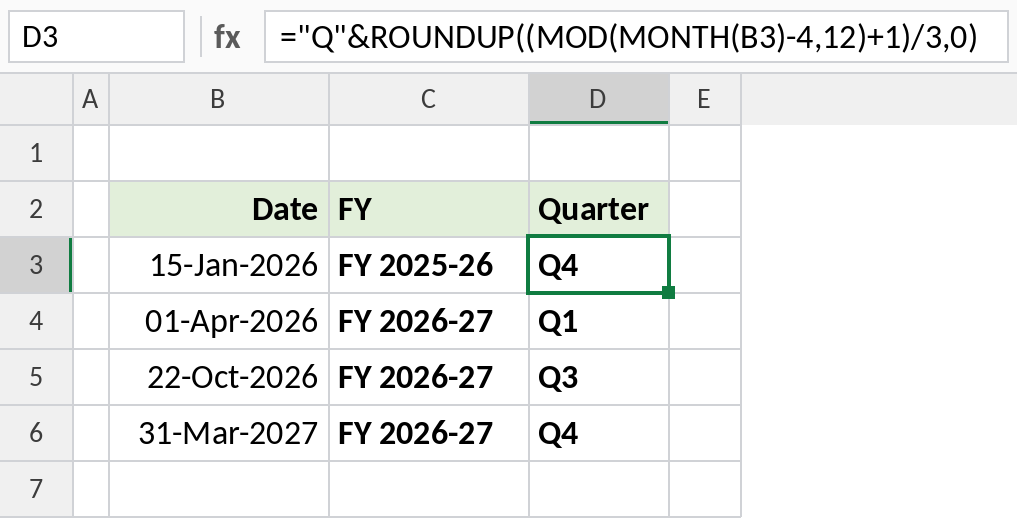
October is the 7th month of the financial year, so 22-Oct-2026 is in Q3.
Which formula to use
| To get | Formula |
|---|---|
| FY label: FY 2026-27 | ="FY "&(YEAR(B3)-(MONTH(B3)<4))&"-"&RIGHT(YEAR(B3)-(MONTH(B3)<4)+1,2) |
| FY start year: 2026 | =YEAR(B3)-(MONTH(B3)<4) |
| FY end year: 2027 | =YEAR(B3)+(MONTH(B3)>=4) |
| FY quarter: Q3 | ="Q"&ROUNDUP((MOD(MONTH(B3)-4,12)+1)/3,0) |
| First day of the FY | =DATE(YEAR(B3)-(MONTH(B3)<4),4,1) |
| Assessment year label | ="AY "&(YEAR(B3)-(MONTH(B3)<4)+1)&"-"&RIGHT(YEAR(B3)-(MONTH(B3)<4)+2,2) |
Notes
- For a different start month, replace 4 with that month: 7 for July to June.
- The FY label is text. Use the start-year formula when you need a number to sum or filter by.
- In a PivotTable, add a helper column with the FY label and group by it.
Common errors
| Problem | Cause | Fix |
|---|---|---|
| FY is one year off | Using >4 instead of <4 |
April belongs to the new FY: use MONTH(B3)<4 |
#VALUE! |
Date stored as text | Convert it to a real date |
| Quarter shows decimals | ROUNDUP left out | Wrap the division in ROUNDUP(…,0) |
Practice file
Dates across a financial year with the FY label and quarter formulas.