The Excel MOD function returns the remainder after one number is divided by another. 17 divided by 5 is 3 with 2 left over, so MOD(17,5) is 2.
number |
The number to divide. |
|---|---|
divisor |
The number to divide by. It can’t be 0. |
Table of Contents
Basic example
MOD returns what’s left over after dividing:
=MOD(B3,C3) 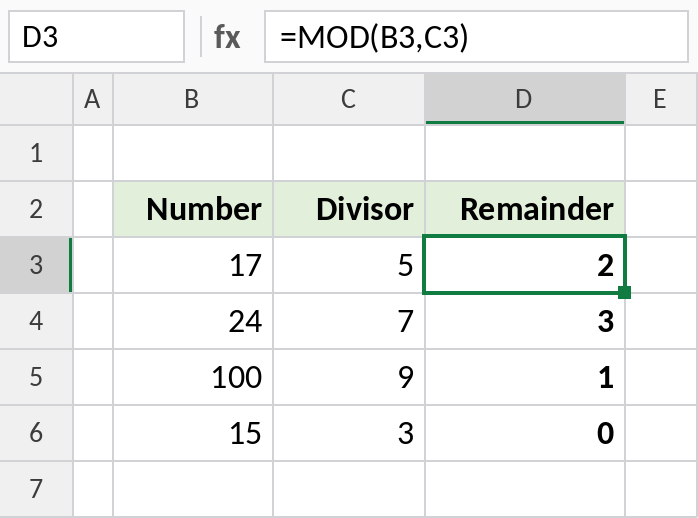
5 goes into 17 three times (15), leaving 2. 15 ÷ 3 divides exactly, so the remainder is 0.
Even or odd
A number is even when dividing by 2 leaves nothing over:
=IF(MOD(B4,2)=0,"Even","Odd") 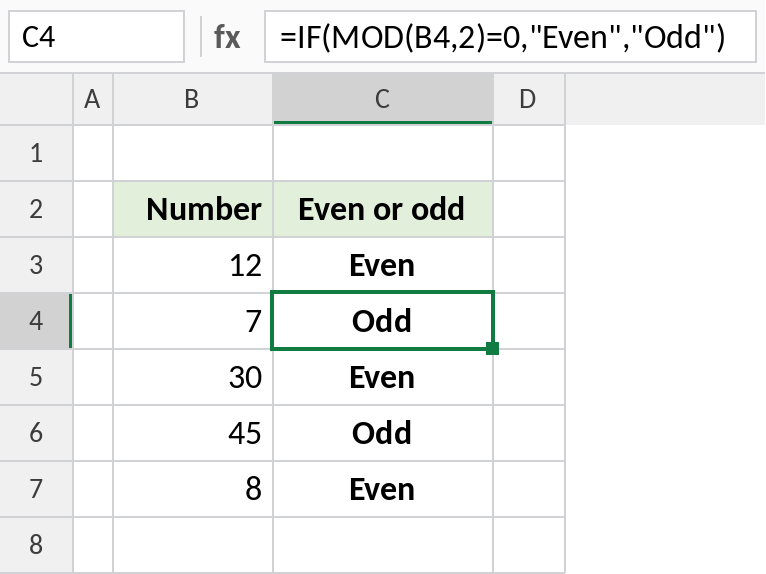
7 ÷ 2 leaves 1, so it’s Odd. The same idea, =MOD(ROW(),2)=0, is the classic formula for shading every other row with conditional formatting.
Hours for shifts that cross midnight
End minus start gives a negative time when a shift ends after midnight. MOD with a divisor of 1 wraps it into the right number of hours:
=MOD(C4-B4,1) 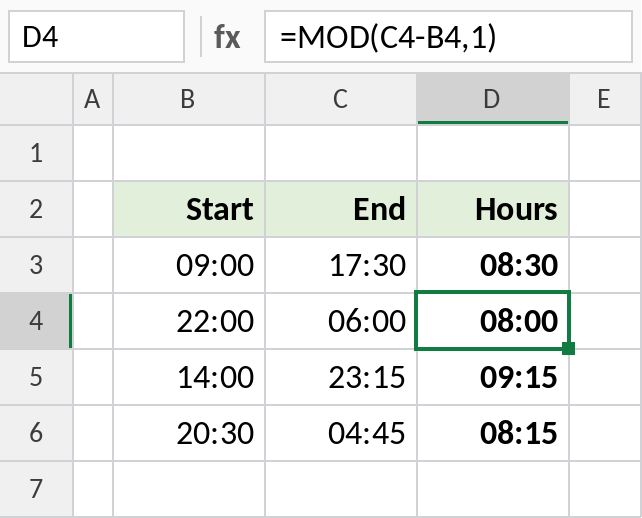
06:00 − 22:00 is negative, which Excel shows as #####. MOD(C4-B4,1) returns 08:00. For normal shifts, like 09:00 to 17:30, it gives the same result as plain subtraction.
Useful MOD formulas
| Formula | Result | Does |
|---|---|---|
=MOD(ROW(),2)=0 |
TRUE on even rows | Shade alternate rows |
=MOD(125,60) |
5 | Leftover minutes after whole hours |
=MOD(-17,5) |
3 | Takes the sign of the divisor |
=MOD(7.5,2) |
1.5 | Works with decimals |
Notes
- The result always has the same sign as the divisor, so
MOD(-17,5)is 3, not -2. - A divisor of 0 returns
#DIV/0!. - To get the whole number of times one number goes into another, use
INT(number/divisor)or QUOTIENT. - MOD with 1 returns the decimal part of a number, which is why it works for times.
Common errors
| Problem | Cause | Fix |
|---|---|---|
#DIV/0! |
Divisor is 0 or empty | Check the divisor |
| Negative times show ##### | Shift crosses midnight | Use =MOD(end-start,1) |
| Unexpected sign | The result follows the divisor’s sign | Use ABS if you need a positive remainder |
Practice file
All three examples plus the useful formulas in a cheat sheet.