CGPA is a credit-weighted average of grade points: subjects with more credits count more. In Excel, SUMPRODUCT multiplies each grade by its credits, and dividing by the total credits gives the CGPA. You can then convert it to a percentage.
CGPA from credits and grade points
Multiply each subject’s credits by its grade point, add them up, and divide by the total credits:
=SUMPRODUCT(C3:C7,D3:D7)/SUM(C3:C7)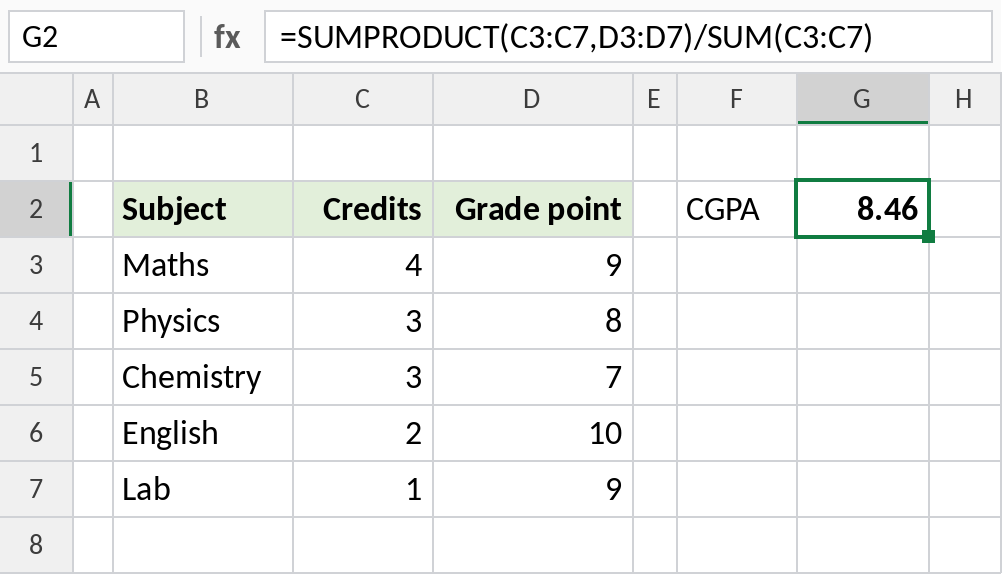
The credit-weighted average is 8.46. A simple AVERAGE of the grade points would give 8.6, because it treats the 1-credit lab the same as 4-credit Maths.
How the formula works
SUMPRODUCT(C3:C7,D3:D7)multiplies credits by grade points for each subject and adds them: 4×9 + 3×8 + 3×7 + 2×10 + 1×9 = 110.SUM(C3:C7)is the total credits: 13.- 110 / 13 = 8.46, the CGPA.
Convert CGPA to a percentage
CBSE and many universities convert CGPA to a percentage by multiplying by 9.5:
=B3*9.5/100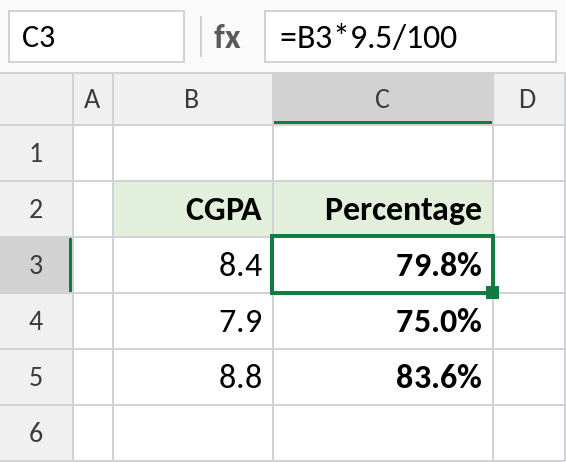
A CGPA of 8.4 is 79.8%. Check your university’s rules: some use a different factor, such as (CGPA-0.75)*10.
Overall CGPA from semester SGPAs
The same formula combines semesters: weight each semester’s SGPA by its credits:
=SUMPRODUCT(C3:C6,D3:D6)/SUM(C3:C6)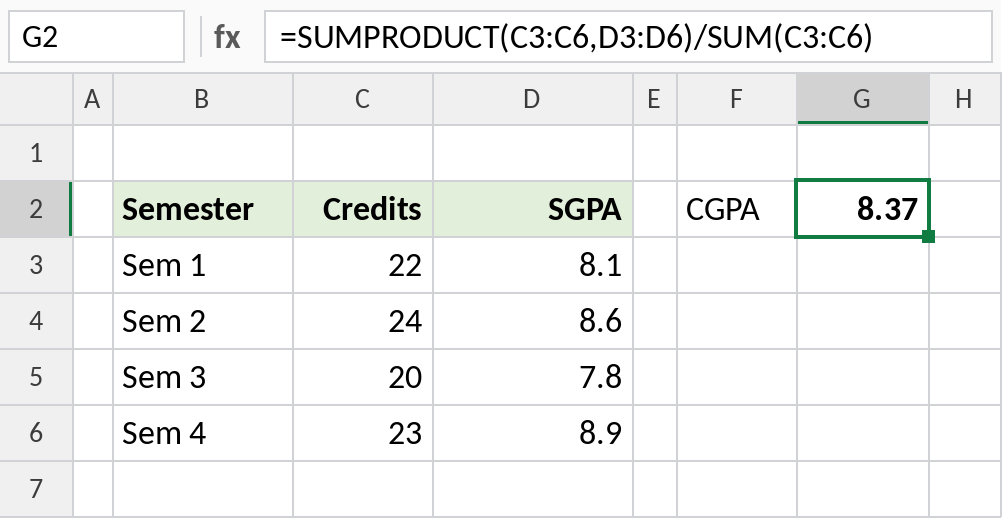
Four semesters give an overall CGPA of 8.37.
Grade letter to grade point
If you have letter grades, look up the points first with XLOOKUP or VLOOKUP. A common 10-point scale:
| Grade | Points |
|---|---|
| O | 10 |
| A+ | 9 |
| A | 8 |
| B+ | 7 |
| B | 6 |
| C | 5 |
| F | 0 |
Scales differ between universities, so use your own grading table.
Notes
- Don’t use AVERAGE for CGPA unless every subject has the same credits.
- Round the final CGPA as your university does, usually to 2 decimals, with ROUND.
- For failed subjects that are re-taken, follow your university’s rule on which grade counts.
Common errors
| Problem | Cause | Fix |
|---|---|---|
| CGPA too high or too low | AVERAGE used instead of SUMPRODUCT | Weight by credits |
#VALUE! |
A grade letter in the points column | Convert letters to points first |
#DIV/0! |
No credits entered | Fill in the credits column |
Practice file
All three examples plus a grade-point table.