The Excel SUBTOTAL function totals, averages or counts only the rows you can see. When you filter a list, its result changes to match the visible rows.
function_num |
Which calculation: 9 for SUM, 1 for AVERAGE, 3 for COUNTA and so on. Add 100 (109, 101, 103) to also ignore rows hidden by hand. |
|---|---|
ref1 |
The range to summarise. |
ref2, ... optional |
More ranges, up to 254. |
Table of Contents
Basic example
This list is filtered to show North only. SUBTOTAL with 9 adds just the visible rows, while SUM adds everything:
=SUBTOTAL(9,D3:D10) 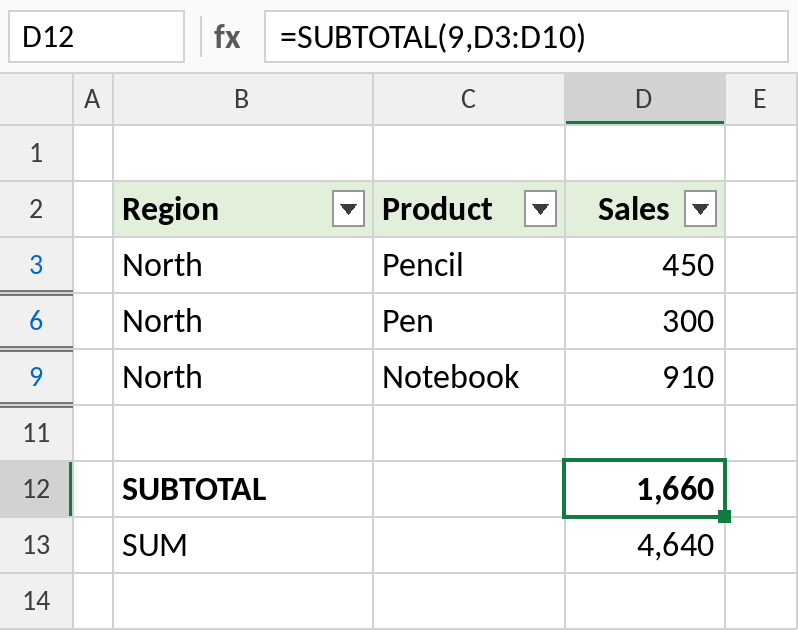
The blue row numbers show the list is filtered. SUBTOTAL returns 1,660, the North total, while SUM still returns 4,640. Clear the filter and both show 4,640.
Rows hidden by hand: 9 vs 109
Rows 5 and 8 are hidden with right-click → Hide, not with a filter. Here, function number 9 and 109 behave differently:
=SUBTOTAL(109,D3:D10) 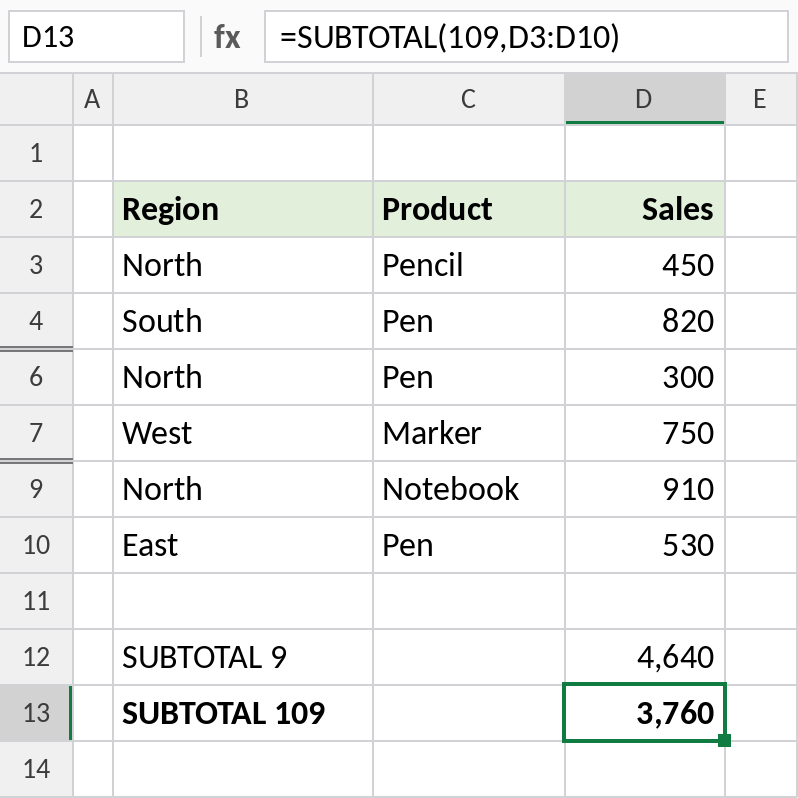
9 still includes the hidden rows (4,640). 109 leaves them out (3,760). Both ignore rows hidden by a filter. Use the 100-series when you want hidden rows excluded no matter how they were hidden.
Average and count visible rows
Change the function number for other calculations. 101 averages and 103 counts the visible entries:
=SUBTOTAL(101,D3:D10) 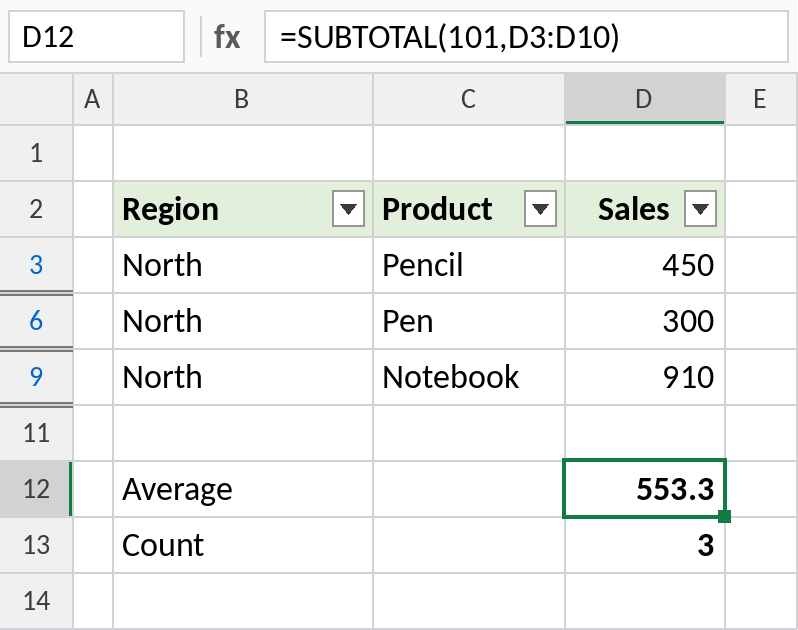
With North filtered, the average is 553.3 and the count is 3. These update instantly every time you change the filter.
Function numbers
| Calculation | Ignore filtered rows | Also ignore hidden rows |
|---|---|---|
| AVERAGE | 1 | 101 |
| COUNT | 2 | 102 |
| COUNTA | 3 | 103 |
| MAX | 4 | 104 |
| MIN | 5 | 105 |
| SUM | 9 | 109 |
Numbers 6 to 11 (PRODUCT, STDEV, VAR and so on) follow the same pattern.
Notes
- SUBTOTAL ignores other SUBTOTAL formulas inside its range, so a grand total doesn’t double-count subtotals.
- AutoSum on a filtered list inserts
SUBTOTAL(9,...)automatically. - SUBTOTAL only ignores hidden rows. Hidden columns are still included.
- To also skip error values, use AGGREGATE.
Common errors
| Problem | Cause | Fix |
|---|---|---|
| Total doesn’t change when filtering | SUM was used instead of SUBTOTAL | Use =SUBTOTAL(9,range) |
| Hidden rows still counted | Function number 9 with rows hidden by hand | Use 109 |
#VALUE! |
A function number that doesn’t exist, such as 12 | Use 1–11 or 101–111 |
#DIV/0! with 101 |
No visible rows | Wrap with IFERROR |
Practice file
All three examples, with the filter and hidden rows already set up.