To count how many dates fall in 2020, use COUNTIFS with a date range: =COUNTIFS(B3:B15,">="&DATE(2020,1,1),B3:B15,"<"&DATE(2021,1,1)). SUMPRODUCT with YEAR does the same in a shorter formula.
Table of Contents
Method 1: COUNTIFS
=COUNTIFS(B3:B15,">="&DATE(2020,1,1),B3:B15,"<"&DATE(2021,1,1))Counts dates on or after 1 January 2020 and before 1 January 2021. With the year in D6: =COUNTIFS(B3:B15,">="&DATE(D6,1,1),B3:B15,"<"&DATE(D6+1,1,1)). COUNTIFS is fast on large data and works in every version.
Method 2: SUMPRODUCT and YEAR
=SUMPRODUCT(--(YEAR($B$3:$B$15)=2020))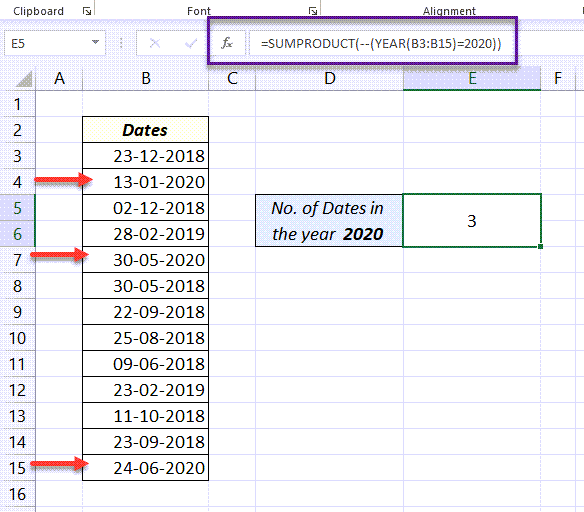
| Step | Result |
|---|---|
YEAR($B$3:$B$15) |
{2018;2020;2018;2019;2020;…} |
=2020 |
TRUE for each 2020 date |
-- |
1 for TRUE, 0 for FALSE |
SUMPRODUCT |
Adds them: 3 |
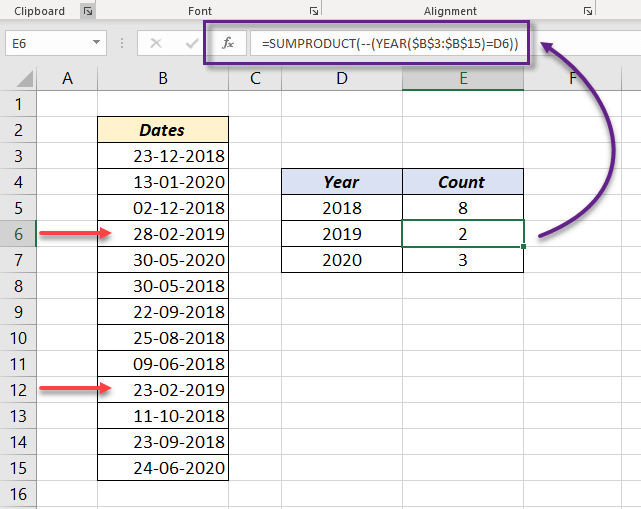
With the year in D6: =SUMPRODUCT(--(YEAR($B$3:$B$15)=D6)) returns 2 for 2019.
A year and month
=SUMPRODUCT((YEAR(B3:B15)=2020)*(MONTH(B3:B15)=6))Multiplying two conditions works like AND. For birthdays in a month whatever the year, see count birthdays of a month.
Count for every year at once
In Excel 365, list each year with its count:
=GROUPBY(YEAR(B3:B15),B3:B15,COUNT)In any version, a PivotTable with the date in Rows (grouped by Years) and in Values (Count) does the same.
Things to know
- The cells must hold real dates. Text that looks like a date returns
#VALUE!in YEAR and isn't counted by COUNTIFS. - Blank cells count as year 1900 in YEAR, so they won't match 2020 but could affect other checks.