Excel has no WORDCOUNT function, but you can count the words in a cell by counting the spaces. TRIM removes extra spaces first, and the number of words is the number of spaces plus one.
ProblemNumber of words in a cell, or how often a word appears
Functions usedLEN, TRIM, SUBSTITUTE
Works inAll Excel versions
Count the words in a cell
=IF(TRIM(B3)="",0,LEN(TRIM(B3))-LEN(SUBSTITUTE(TRIM(B3)," ",""))+1)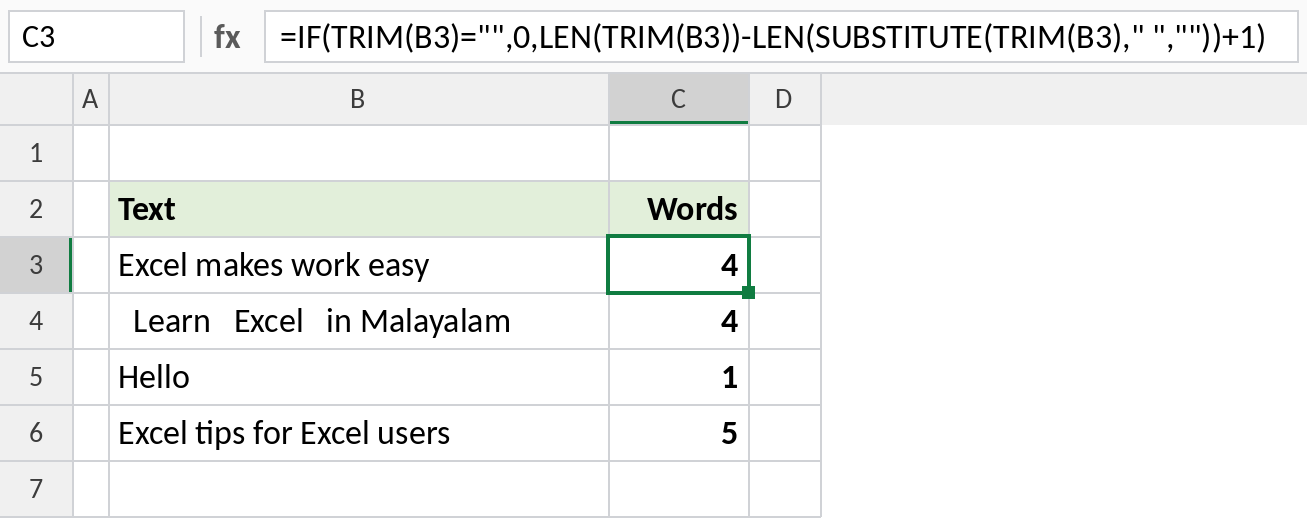
Row 4 has extra spaces at the start, end and between words, but TRIM cleans them, so it still counts 4 words. The IF returns 0 for an empty cell.
How the formula works
TRIM(B3)removes spaces at the ends and leaves one space between words.LEN(TRIM(B3))is the length with spaces, andLEN(SUBSTITUTE(TRIM(B3)," ",""))the length without them. The difference is the number of spaces.- There's always one more word than spaces, so add 1.
Count how many times a word appears
Remove the word and see how much shorter the text gets:
=(LEN(B3)-LEN(SUBSTITUTE(LOWER(B3),"excel","")))/LEN("excel")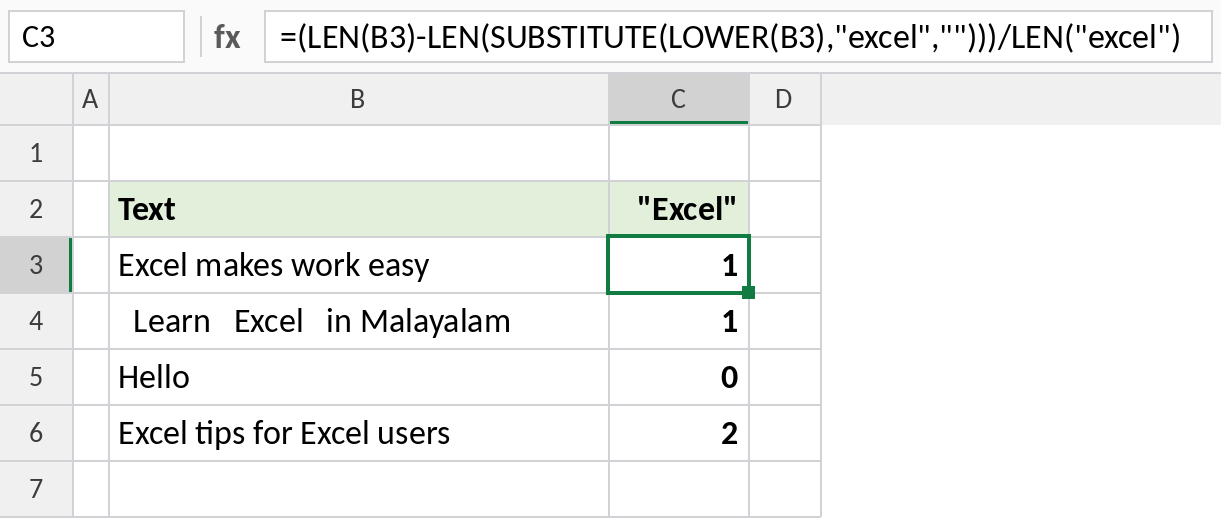
The last row mentions Excel 2 times. LOWER makes the count ignore capitals. It also counts the word inside longer words, such as Excellent.
Which formula to use
| To get | Formula |
|---|---|
| Words in a cell | =IF(TRIM(B3)="",0,LEN(TRIM(B3))-LEN(SUBSTITUTE(TRIM(B3)," ",""))+1) |
| Words (Excel 365) | =IF(TRIM(B3)="",0,COUNTA(TEXTSPLIT(TRIM(B3)," "))) |
| Words in a range | =SUMPRODUCT(LEN(TRIM(B3:B6))-LEN(SUBSTITUTE(TRIM(B3:B6)," ",""))+(TRIM(B3:B6)<>"")) |
| Times a word appears | =(LEN(B3)-LEN(SUBSTITUTE(LOWER(B3),"excel","")))/LEN("excel") |
| Characters in a cell | =LEN(B3) |
Notes
- Line breaks inside a cell aren't spaces. Replace them first:
SUBSTITUTE(B3,CHAR(10)," "). - Hyphenated words such as year-end count as one word.
- The word-count formula needs the IF; without it, an empty cell would count as 1.
Common errors
| Problem | Cause | Fix |
|---|---|---|
| Count is 1 for an empty cell | IF part left out | Use the full formula with IF |
| Count too low | Words separated by line breaks | Replace CHAR(10) with a space first |
| Word count includes parts of longer words | SUBSTITUTE matches text anywhere | Search for " excel " with spaces, after adding spaces at both ends |
Practice file
The sample texts with both formulas. Type your own sentences in column B.