The Excel DATE function builds a real date from a year, a month and a day. It’s the reliable way to create dates inside formulas.
year |
The year, as four digits such as 2026. |
|---|---|
month |
The month, 1 to 12. Larger or smaller numbers roll into other years. |
day |
The day of the month. Larger or smaller numbers roll into other months. |
Table of Contents
Basic example
When the year, month and day are in separate cells, DATE joins them into one real date:
=DATE(B3,C3,D3) 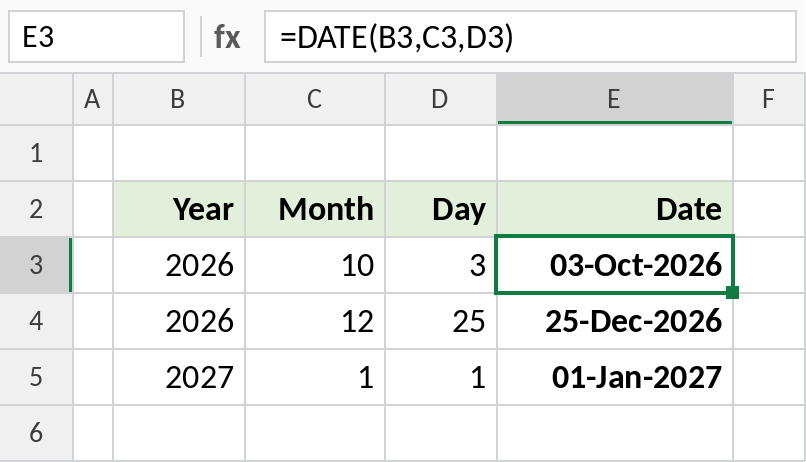
2026, 10 and 3 become 03-Oct-2026. Because it’s a real date, you can sort it, subtract it and format it any way you like.
Convert text like 20261003 to a date
Downloads often store dates as text in year-month-day order. Cut out each part and give them to DATE:
=DATE(LEFT(B3,4),MID(B3,5,2),RIGHT(B3,2)) 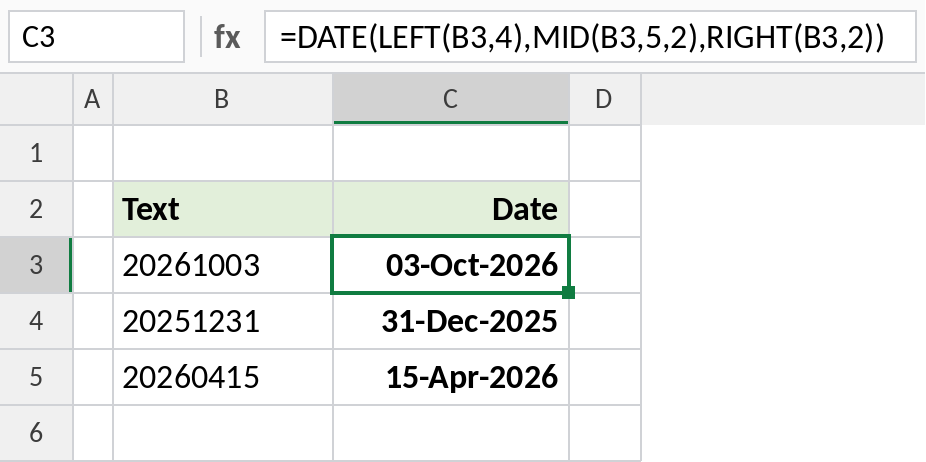
LEFT takes 2026, MID takes 10 and RIGHT takes 03, so the result is 03-Oct-2026. DATE accepts the text pieces and converts them to numbers itself.
First and last day of the month
Day 1 gives the first day of the month. Day 0 of the next month gives the last day of this one:
=DATE(YEAR(B3),MONTH(B3)+1,0) 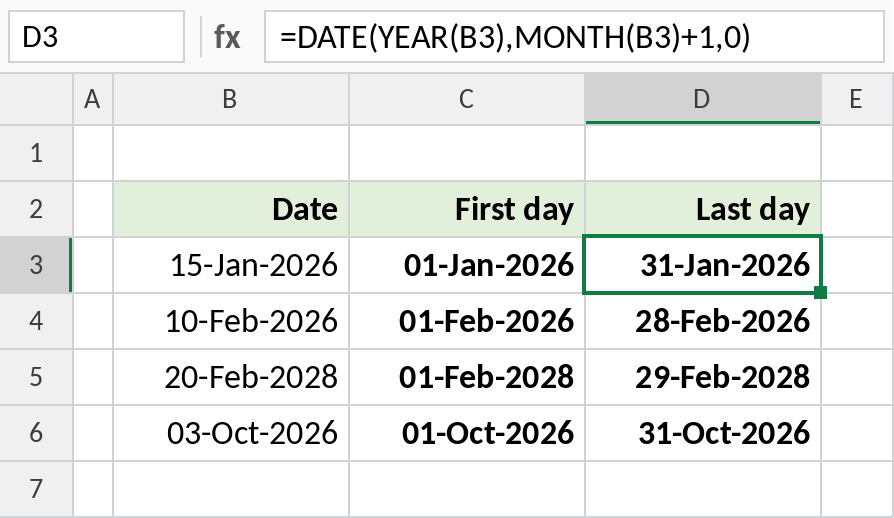
For 15-Jan-2026, the last day is 31-Jan-2026. It even handles leap years: February 2028 ends on 29-Feb-2028.
DATE rolls over automatically
| Formula | Result | Why |
|---|---|---|
=DATE(2026,13,1) |
01-Jan-2027 | Month 13 is January of the next year |
=DATE(2026,1,32) |
01-Feb-2026 | Day 32 rolls into February |
=DATE(2026,3,0) |
28-Feb-2026 | Day 0 is the last day of the month before |
=DATE(2026,10,3)+30 |
02-Nov-2026 | Add days with + |
=DATE(26,1,1) |
01-Jan-1926 | Two-digit years are added to 1900 |
Notes
- Always type four-digit years. Excel adds 0 to 1899 to 1900, so
DATE(26,1,1)means 1926. - Use DATE in formulas instead of typing dates as text, such as
">="&DATE(2026,4,1). Text dates can be read differently in different regions. - Months and days outside the normal range roll over, which makes adding months easy:
=DATE(YEAR(B3),MONTH(B3)+3,DAY(B3)). - If DATE shows a number like 46298, format the cell as a date.
Common errors
| Problem | Cause | Fix |
|---|---|---|
| Shows a number | The cell isn’t formatted as a date | Format it as a date |
| Wrong century | Two-digit year, such as 26 | Use 2026 |
#NUM! |
Year before 1900 or after 9999, or a negative result | Check the year |
#VALUE! |
A part is text that isn’t a number | Check the LEFT/MID/RIGHT pieces |
Practice file
All three examples plus the rollover examples in a cheat sheet.