The Excel SQRT function returns the square root of a positive number.
PurposeSquare root
ReturnsA number
Available inAll Excel versions, Excel for the web, Google Sheets
number |
The number to find the square root of. Must be 0 or more. |
|---|
Table of Contents
Basic example
SQRT returns the number that, multiplied by itself, gives the original:
=SQRT(B3)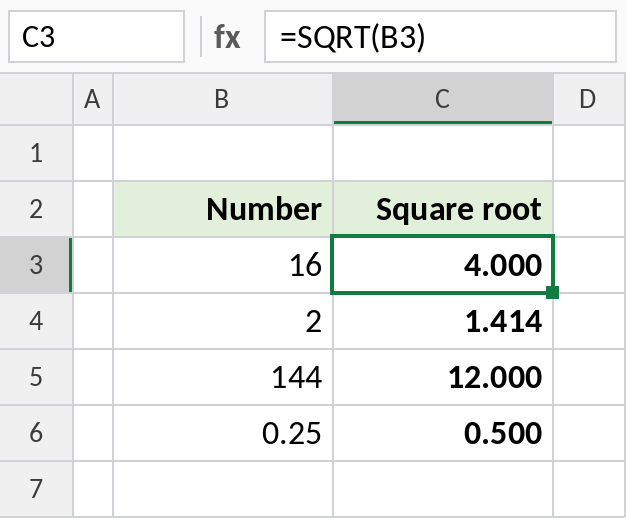
The square root of 16 is 4, and of 2 is about 1.414.
Find the hypotenuse
Pythagoras’ theorem: the long side of a right triangle is the square root of the sum of the squares of the other two:
=SQRT(B3^2+C3^2)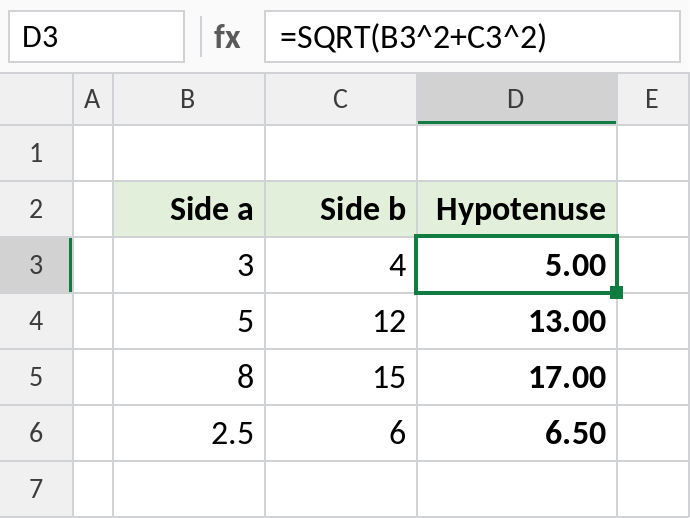
Sides 3 and 4 give a hypotenuse of 5. Engineers use the same formula for the straight-line distance between two points.
Side of a square from its area
A square plot of 100 m² has sides of:
=SQRT(B3)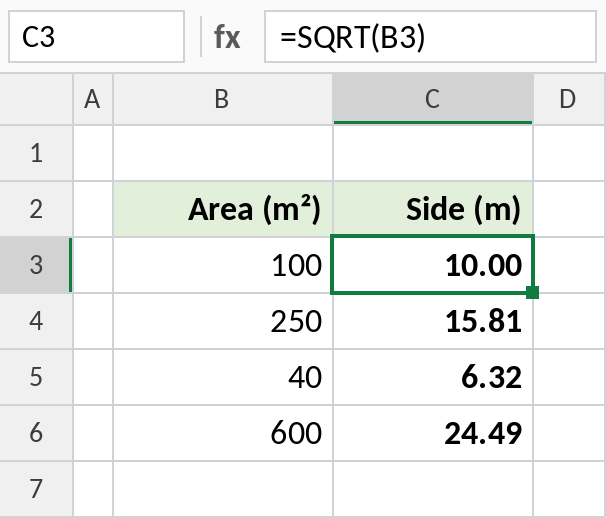
10.00 m. A 250 m² plot has sides of 15.81 m.
Other roots and powers
| Formula | Returns |
|---|---|
=SQRT(16) |
4 |
=16^(1/2) |
4, the same as SQRT |
=27^(1/3) |
3, the cube root |
=SQRT(ABS(-16)) |
4, avoiding #NUM! |
For other roots, use POWER or the ^ operator with a fraction.
Notes
- A negative number returns
#NUM!. Wrap it in ABS if you only need the size. - For cube roots and others, use
^(1/n)or POWER. - SQRTPI returns the square root of a number multiplied by π.
Common errors
| Problem | Cause | Fix |
|---|---|---|
#NUM! |
Negative number | Use ABS, or check the data |
#VALUE! |
Text instead of a number | Convert it with VALUE |
Practice file
All three examples plus other roots in a cheat sheet.