The Excel EDATE function adds or subtracts whole months from a date. It handles different month lengths for you, so 31-Jan plus one month is 28-Feb, not 3-Mar.
start_date |
The starting date. |
|---|---|
months |
How many months to add. Negative numbers go back. |
Table of Contents
Basic example
To find the date 3 months after each start date:
=EDATE(B4,3)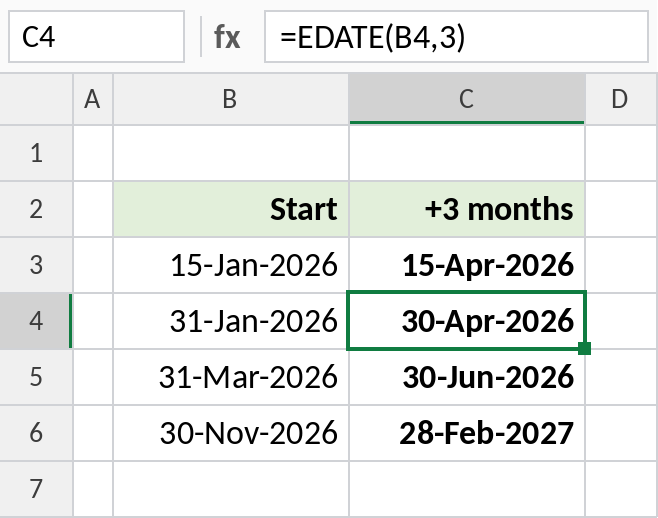
15-Jan becomes 15-Apr. 31-Jan becomes 30-Apr-2026, because April has no 31st, so EDATE uses the last day of the month.
Go back in time
Use a negative number of months to go back, for example to find the start of a 6-month review period:
=EDATE(B3,-6)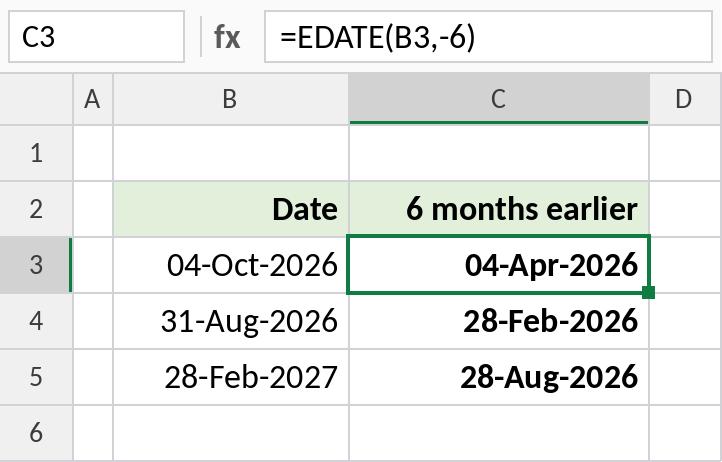
04-Oct-2026 minus 6 months is 04-Apr-2026. 31-Aug-2026 goes back to 28-Feb-2026.
Add years for warranty or renewal dates
There’s no “add years” function. Multiply the years by 12 and use EDATE:
=EDATE(C3,12*D3)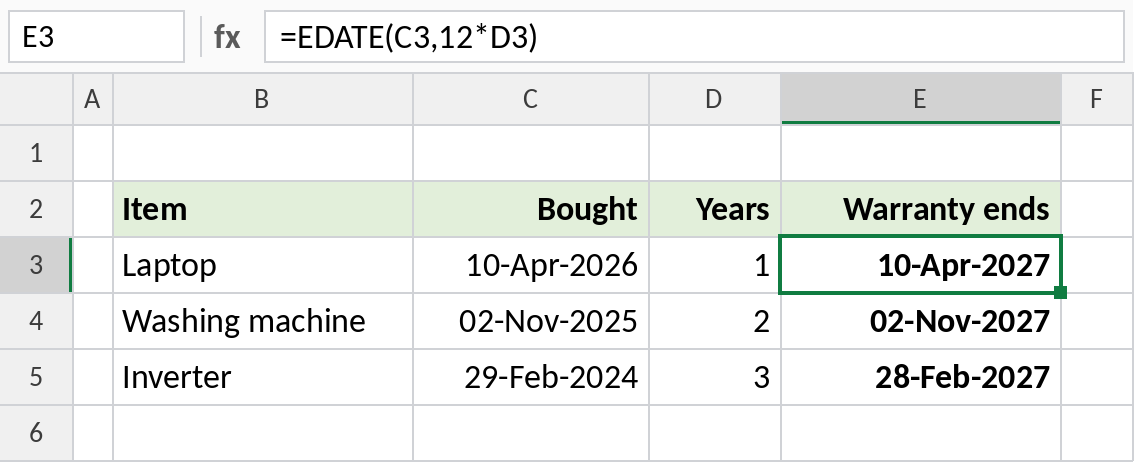
A laptop bought on 10-Apr-2026 with a 1-year warranty is covered until 10-Apr-2027. The inverter, bought on 29-Feb-2024, ends on 28-Feb-2027, since 2027 isn’t a leap year.
EDATE vs EOMONTH vs adding days
| Formula | For 15-Jan-2026 | Use it for |
|---|---|---|
=EDATE(B3,1) |
15-Feb-2026 | Same day next month |
=EOMONTH(B3,1) |
28-Feb-2026 | End of next month |
=B3+30 |
14-Feb-2026 | Exactly 30 days later |
See EOMONTH for month-end dates.
Notes
- EDATE returns a date serial number. Format the cell as a date.
- If the start day doesn’t exist in the target month, EDATE uses that month’s last day.
- Decimals in
monthsare cut off, so 1.5 acts as 1. - For age or time between two dates, use DATEDIF.
Common errors
| Problem | Cause | Fix |
|---|---|---|
| Shows a number like 46127 | The cell isn’t formatted as a date | Format it as a date |
#VALUE! |
The start date is text | Use a real date |
| Expected the 31st | The target month is shorter | That’s correct; use EOMONTH if you always want the month end |
Practice file
All three examples plus the comparison in a cheat sheet.