The Excel PMT function calculates the regular payment for a loan or a savings goal, based on a fixed interest rate. It’s the formula behind every EMI calculator.
rate |
The interest rate per period. For monthly payments, divide the annual rate by 12. |
|---|---|
nper |
The total number of payments. For monthly, multiply the years by 12. |
pv |
The loan amount today. Enter it as negative to get a positive payment. |
fv optional |
The amount you want at the end. Use it for savings goals. Default is 0. |
type optional |
0 for payments at the end of each period (default), 1 for the start. |
Table of Contents
Basic example: loan EMI
For a loan of 10 lakh (1,000,000) at 9% a year for 20 years, divide the rate by 12 and multiply the years by 12 to work in months:
=PMT(C4/12,C5*12,-C3)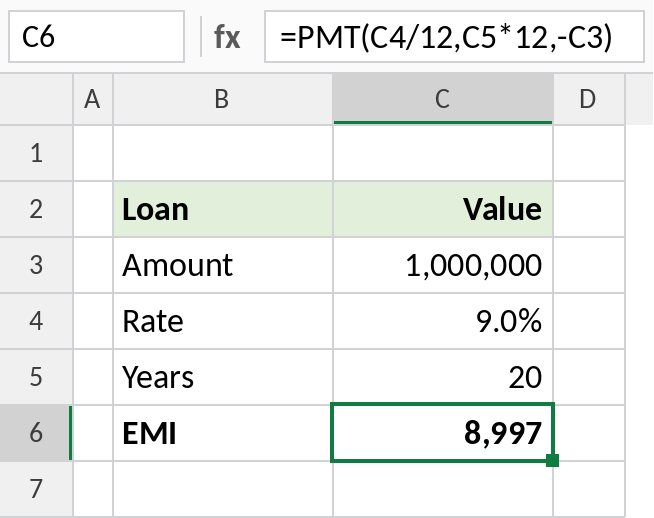
The monthly EMI is 8,997. The minus sign before C3 makes the result positive, because Excel treats money you receive and money you pay as opposite signs.
Compare loan tenures
Fill the formula down to see how the tenure changes the EMI and the total you repay:
=PMT($G$3/12,B3*12,-$G$2)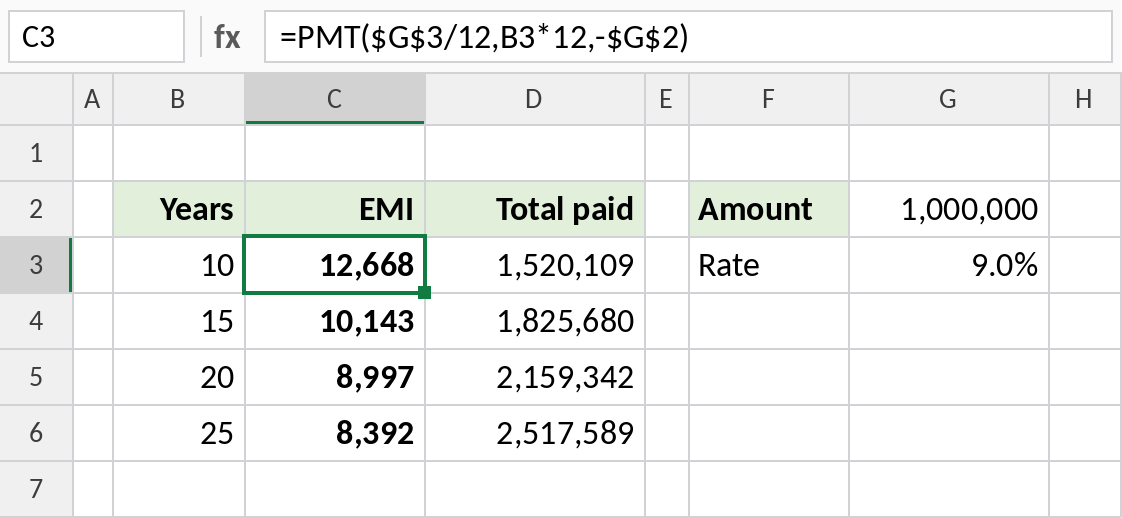
A 10-year loan costs 12,668 a month and 1,520,109 in total. Stretching it to 25 years cuts the EMI to 8,392, but you repay 2,517,589.
Monthly saving for a goal
To reach a target amount, leave pv at 0 and put the target in fv. This assumes a 7% yearly return:
=PMT(C4/12,C5*12,0,-C3)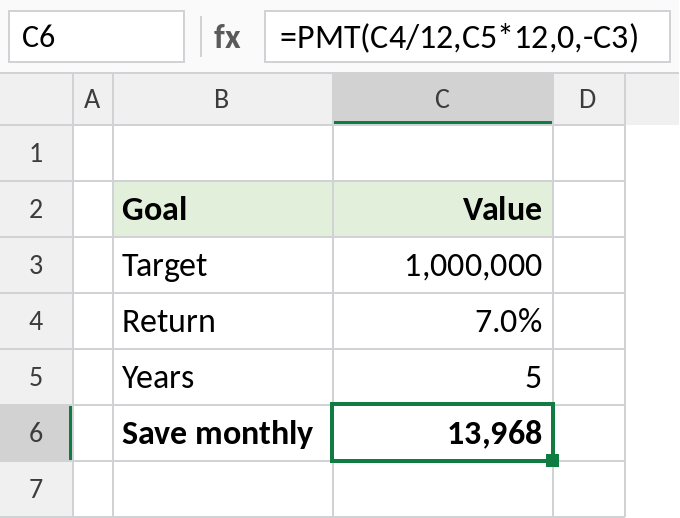
Saving 13,968 a month for 5 years grows to 10 lakh (1,000,000) at 7% a year. To see the balance month by month, see the EMI amortization schedule formula page.
Rate and periods for different payment frequencies
| Pays | rate | nper |
|---|---|---|
| Monthly | annual rate/12 |
years*12 |
| Quarterly | annual rate/4 |
years*4 |
| Yearly | annual rate |
years |
Using the annual rate with monthly periods is the most common PMT mistake. It gives a payment far too high.
Notes
- The result is negative if
pvis positive. Put a minus in front of the loan amount, or of PMT, to show a positive payment. - Keep
rateandnperin the same units: monthly rate with months, yearly rate with years. - PMT assumes a fixed rate for the whole loan. For floating-rate loans, it’s an estimate.
- The EMI includes interest and principal. The split changes every month.
Common errors
| Problem | Cause | Fix |
|---|---|---|
| EMI is far too high | Annual rate used with monthly periods | Divide the rate by 12 |
| Negative result | Sign convention: money paid out is negative | Use -C3 for the loan amount |
#NUM! |
nper is 0, or the values can’t produce a payment | Check the inputs |
Practice file
All three examples plus the rate comparison in a cheat sheet.