The Excel TEXT function turns a number or date into text in the format you choose, such as a day name, a month name or a number with commas.
value |
The number or date to format. |
|---|---|
format_text |
A format code in quotes, such as "dddd" or "#,##0.00". |
Table of Contents
Basic example
To show the day name for each date, use the format code "dddd". Column D uses "mmmm" for the month name:
=TEXT(B3,"dddd") 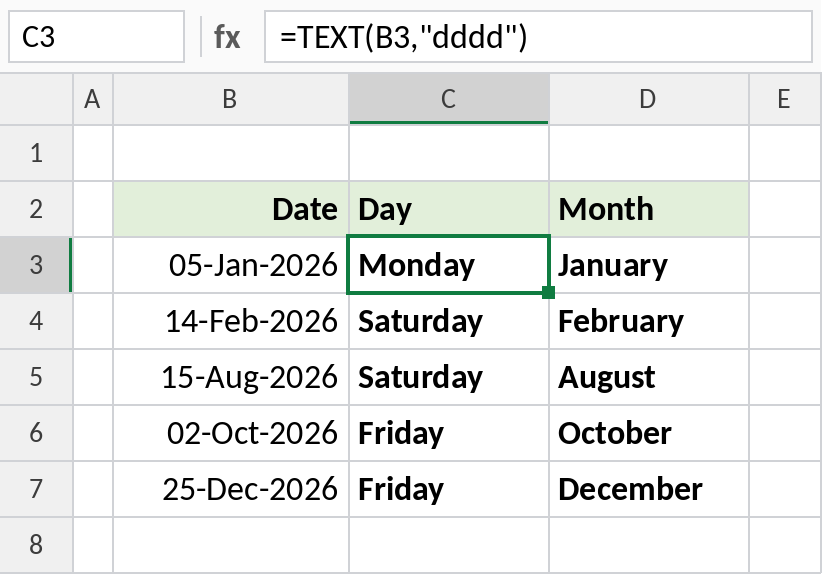
05-Jan-2026 was a Monday in January. Use "ddd" and "mmm" for short names like Mon and Jan.
Put a formatted number in a sentence
When you join a number to text with &, Excel drops its formatting. TEXT keeps the commas and decimals:
="Total: "&TEXT(B3,"#,##0.00") 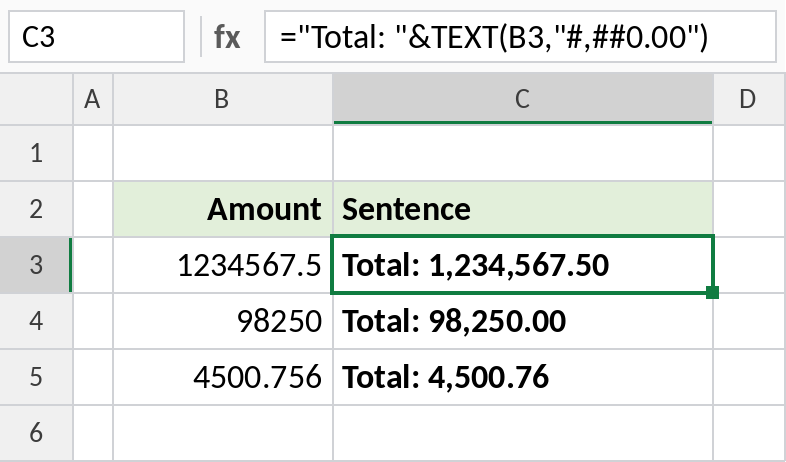
Without TEXT, the result would be Total: 1234567.5. With it, you get Total: 1,234,567.50.
Add leading zeros
Each 0 in the format code is a required digit. Five zeros pad every ID to 5 digits:
=TEXT(B3,"00000") 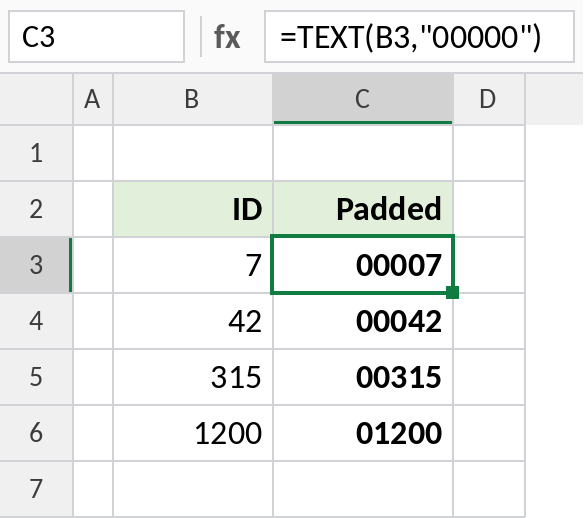
7 becomes 00007 and 1200 becomes 01200. The result is text, which is what you want for IDs and codes.
Common format codes
Results for the date 03-Oct-2026 and the number 0.4567 or 1234.5:
| Formula | Result |
|---|---|
=TEXT(date,"dd/mm/yyyy") |
03/10/2026 |
=TEXT(date,"mmm-yy") |
Oct-26 |
=TEXT(date,"ddd, d mmm") |
Sat, 3 Oct |
=TEXT(0.4567,"0.0%") |
45.7% |
=TEXT(1234.5,"#,##0") |
1,235 |
=TEXT(1234.5,"0.00") |
1234.50 |
Notes
- TEXT returns text, so the result can’t be used in calculations. Keep the original number for maths.
- Format codes go in double quotes. They use the same codes as Format Cells → Custom.
- For a number format that only changes how a cell looks, use Format Cells instead. Use TEXT when you need formatted text inside a formula.
- Format codes can depend on your language settings. In some regions, date codes use different letters.
Common errors
| Problem | Cause | Fix |
|---|---|---|
#VALUE! |
Invalid format code | Check the code against Format Cells → Custom |
| Result won’t add up | TEXT returns text | Use the original value in calculations |
| Month shows as minutes | "mm" next to hours or seconds is read as minutes |
Use "mmm" for the month, or check the code order |
Practice file
All three examples plus the format codes in a cheat sheet.