To find a sale price, multiply the price by 1 minus the discount. To find the discount percentage from two prices, divide the saving by the original price.
ProblemCalculate a sale price or a discount percentage
Functions usedArithmetic
Works inAll Excel versions
Sale price after a discount
20% off means paying 80% of the price, so multiply by 1 minus the discount:
=C3*(1-D3)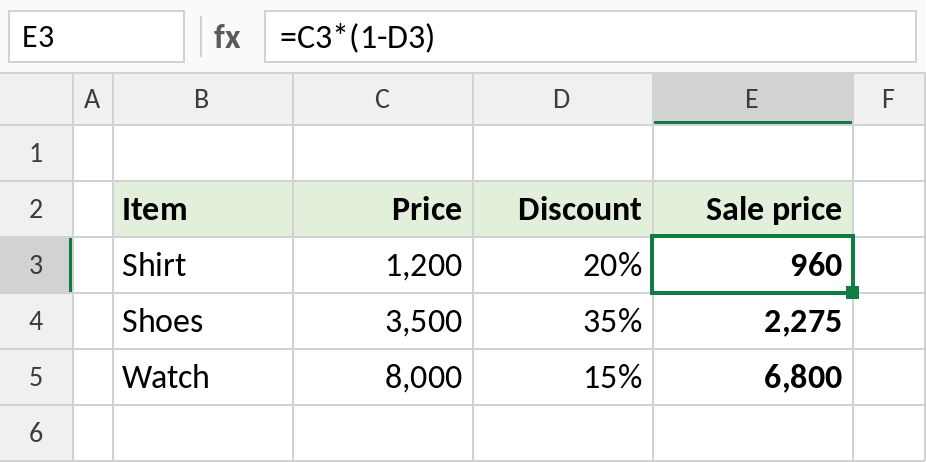
A ₹1,200 shirt with 20% off costs ₹960. The saving itself is =C3*D3, ₹240.
How the formula works
D3is the discount, 20%, stored as 0.2.1-D3is 0.8: the share of the price you still pay.- Multiplying the price by 0.8 gives the sale price.
Discount percentage from two prices
When you know the original and sale prices, divide the saving by the original price:
=(C3-D3)/C3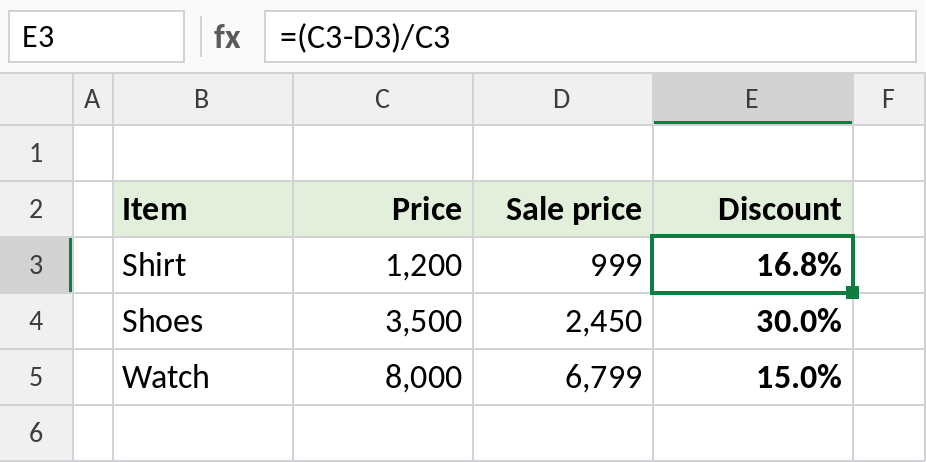
₹1,200 down to ₹999 is a 16.8% discount. =1-D3/C3 gives the same answer.
Two discounts in a row
An extra 10% off an already discounted price isn’t 30% off. Apply each discount in turn:
=C2*(1-C3)*(1-C4)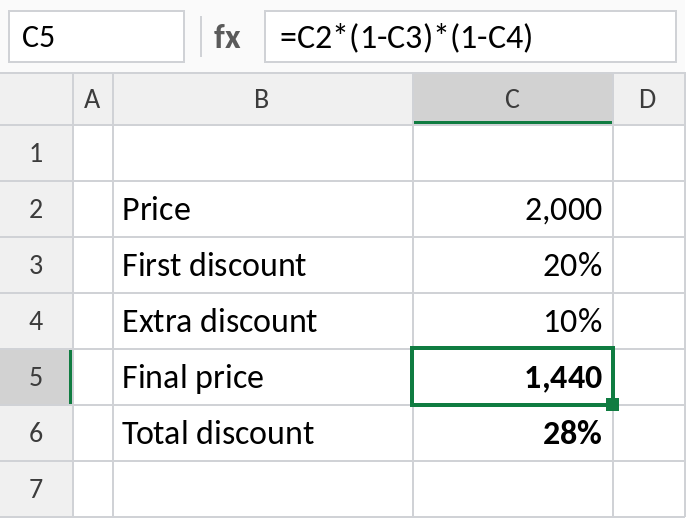
20% then 10% off ₹2,000 gives ₹1,440: a total discount of 28%, not 30%.
Discount formulas
| To calculate | Formula |
|---|---|
| Sale price | =Price*(1-Discount) |
| Amount saved | =Price*Discount |
| Discount % | =(Price-Sale)/Price |
| Original price from sale price | =Sale/(1-Discount) |
| Two discounts | =Price*(1-D1)*(1-D2) |
Notes
- Always divide by the original price, not the sale price, for the discount percentage.
- Round sale prices with ROUND, or to a price ending such as ₹999 with MROUND and a subtraction.
- Discounts are usually applied before GST. Add GST to the sale price, not the original.
Common errors
| Problem | Cause | Fix |
|---|---|---|
| Discount too small | Divided by the sale price | Divide by the original price |
| Extra discount overstated | Discounts added together | Multiply by each (1-discount) in turn |
| Shows 0.2 instead of 20% | Cell not formatted as a percentage | Press Ctrl+Shift+% |
Practice file
All three examples plus the formula table.