CAGR, the compound annual growth rate, is the steady yearly growth that takes a value from its start to its end. In Excel it’s =(End/Start)^(1/Years)-1, or the built-in RRI function.
The CAGR formula
Divide the end value by the start value, raise it to 1 over the number of years, and subtract 1:
=(C3/C2)^(1/C4)-1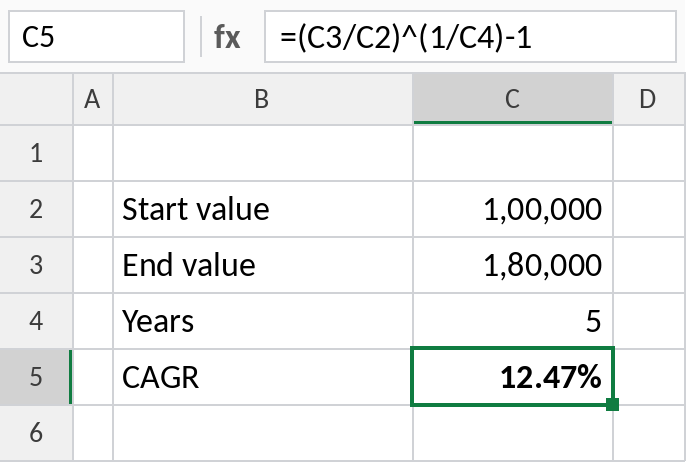
₹1,00,000 growing to ₹1,80,000 in 5 years is a CAGR of 12.47% a year. Format the cell as a percentage.
How the formula works
C3/C2is the total growth: 1,80,000 / 1,00,000 = 1.8, an 80% increase overall.^(1/C4)takes the 5th root, spreading that growth evenly over 5 years: 1.1247.- Subtracting 1 leaves the yearly rate: 0.1247, or 12.47%.
The RRI function
RRI does the same calculation in one function. The arguments are the years, then the start and end values:
=RRI(C4,C2,C3)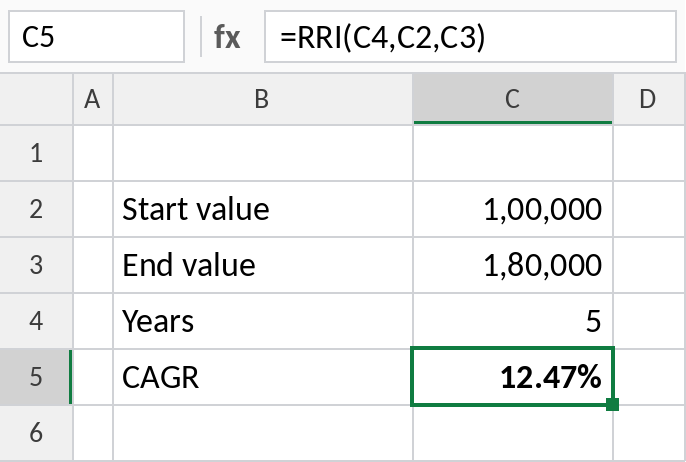
The result is identical. RRI is easier to read; the formula is easier to explain.
CAGR between two dates
For investments that don’t run whole years, let YEARFRAC work out the exact number of years between the dates:
=(F3/D3)^(1/YEARFRAC(C3,E3))-1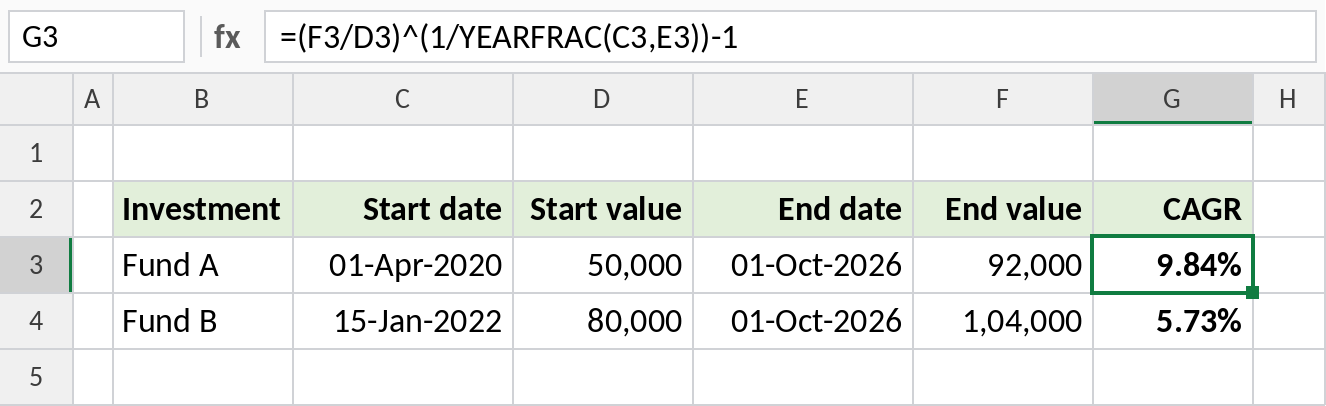
Fund A grew from ₹50,000 to ₹92,000 over about 6.5 years: 9.84% a year.
CAGR vs average growth
For values of 100, 150, 120 and 180 over three years:
| Measure | Result | Meaning |
|---|---|---|
| CAGR | 21.6% | The steady rate that gets from 100 to 180 |
| Average of yearly changes | 26.7% | Overstates growth when values go up and down |
CAGR is the fairer measure for investments and business growth, because it ignores the ups and downs in between.
Notes
- The number of years is the number of periods, not the number of values. Five years of data from 2021 to 2026 is 5 periods.
- CAGR doesn’t work when the start value is 0 or negative.
- To project a value forward at a given CAGR, use
=Start*(1+CAGR)^Years, or FV.
Common errors
| Problem | Cause | Fix |
|---|---|---|
#DIV/0! |
Start value is 0 | CAGR can’t be calculated from zero |
#NUM! |
Negative start or end value | Use another growth measure |
| Rate too high or low | Counted values instead of periods | Use the number of years between the first and last value |
Practice file
All three examples in one workbook.